Build it locally, show the client, then look after the live site
The build is the easy part. Here is the whole arc: a local site, a named review link that does not change, and what happens after the client says yes.
If you build sites for other people, the recurring headache is not the building. It is everything around it: showing the work, and then living with the result for two years.
This post is the whole arc. Build the site on your own computer, show the client a real address, and then look after the live site once it exists. Three stages, two products, one bill that starts at nothing.
Stage one: build it locally
Each client site runs on your machine: WordPress, headless WordPress, Astro, Next.js, plain PHP. The runtime, the database and a trusted certificate are provisioned when the site is created, so it comes up at something like https://acme-co.test with a real padlock. Nothing installs onto your system, and uninstalling leaves the machine as it was. The first-site guide has it.
Several client sites sit side by side in one window. You are not standing up a machine per client.
The unglamorous parts, installing a form plugin, seeding placeholder content, swapping a theme, are what the agent surface is for. The whole app is MCP tools on 127.0.0.1:47200, so “install a contact form on the Acme site and put it on the contact page” is one instruction, and every change is visible and reversible. For WordPress there is also site-level git and one-click plugin branch switching, which answers “what did the header look like last week” without a deploy pipeline.
Stage two: show them
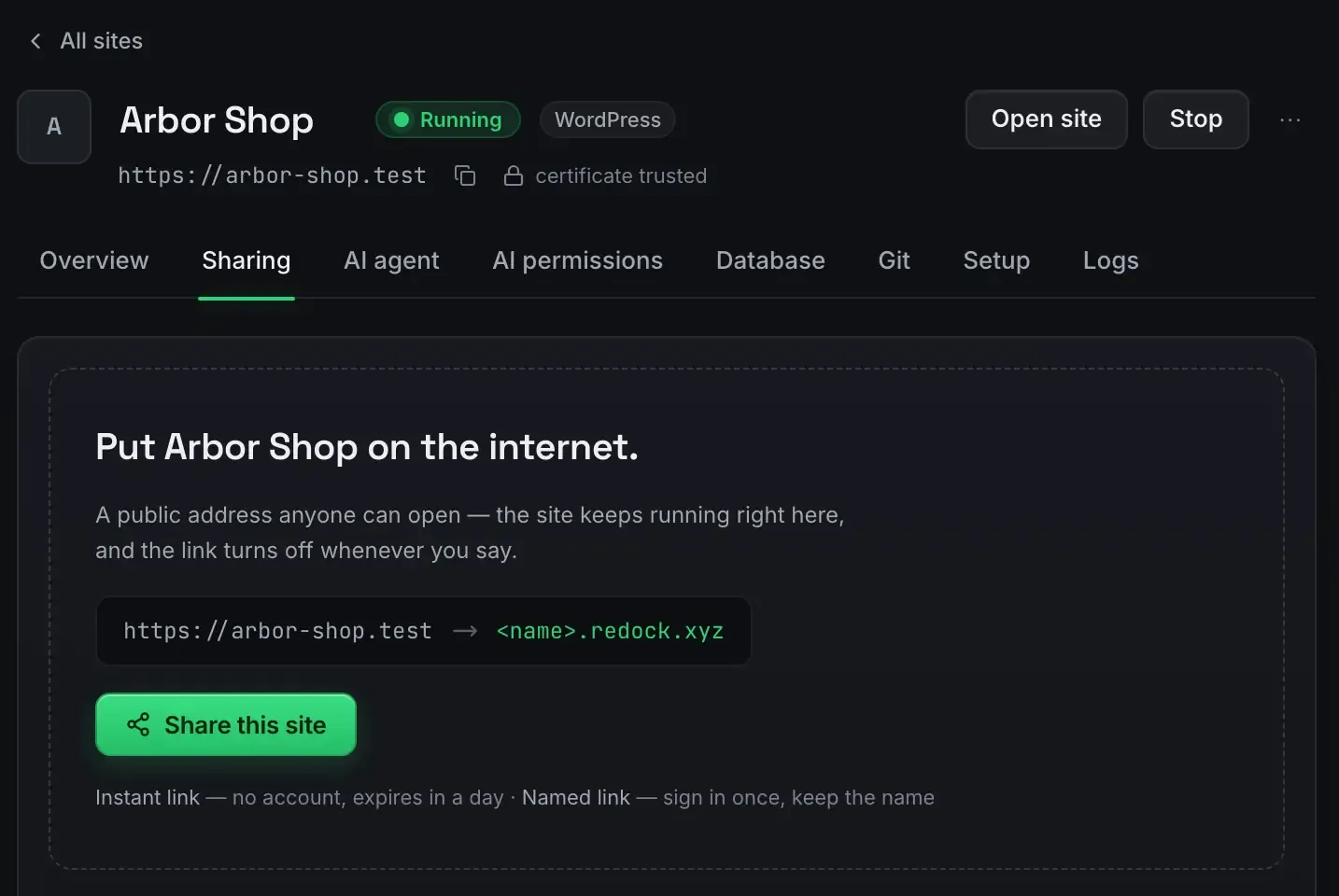
You need an address the client can open, on real HTTPS, that behaves like production, without renting a staging host per project. That is the screen at the top of this post: one button, and the local address becomes a name under redock.xyz.
A named link keeps its name for as long as you use it, so acme-review.redock.xyz still works next week and the message you sent on Monday is not dead by Friday. Three named links are included on every plan, alongside unlimited unlisted ones for quick throwaway shares.
The client opens a real page on any device. It behaves like a live site because it is one, served from your machine over a Cloudflare tunnel. Show a client a work in progress covers this stage on its own.
The honest caveat: your machine has to be awake for the link to serve. For a review call, that is fine, because you are at the machine. For something a client might open at two in the morning, deploy instead.
Stage three: the part nobody plans for
The client says yes. The site goes live on their host. And then, for the next two years, you are the person they email when something breaks.
This is where a freelancer’s tooling usually stops and the awkward part starts. You have no idea what state the site is in. You have their admin password in a note somewhere. When they ask what you did last month, you reconstruct it from memory.
Connect the live site to a workspace with the ReDock Connect plugin and it gets a page of its own.
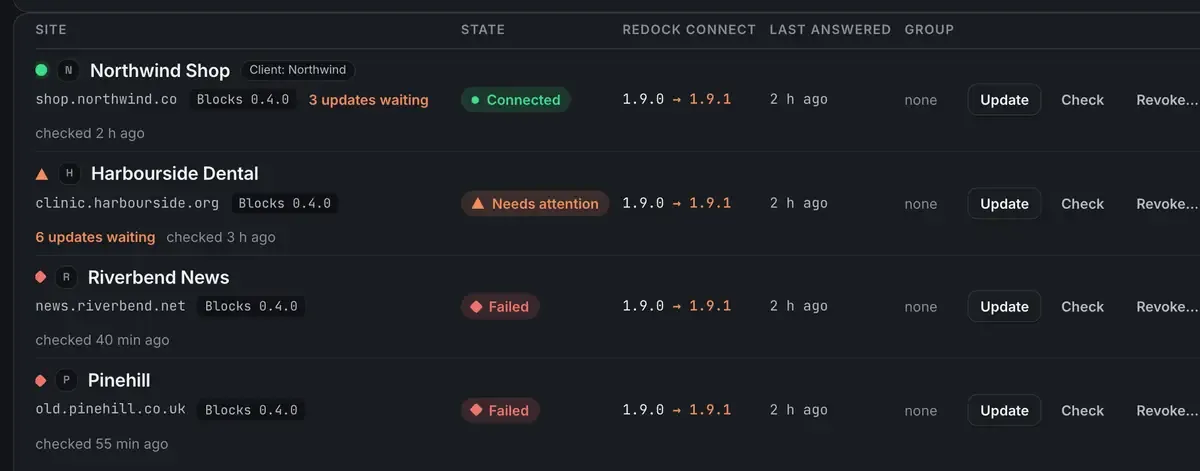
What that buys you:
Health checked several times a day, with reasons rather than a score. The site did not answer the last few checks. PHP reached end of life. WordPress is behind. Scheduled tasks have stalled. A certificate is about to expire. The list sorts by what needs attention.
Plugin updates with a snapshot taken first. Every update is two steps per site: snapshot the plugin, then update it. No snapshot, no update. One press puts the old version back. That is rollback for an update rather than a backup service, and this page is not going to sell you one.
A record. Every change with the time, the site, what was done, who did it and how it ended, kept 400 days, exportable. When a client asks who changed the front page, the answer can be a person, a job or an AI app, and the list reads the same way for all three.
The thing that makes it look like your business
The report is the part clients actually see, and it does not have to have our name on it.
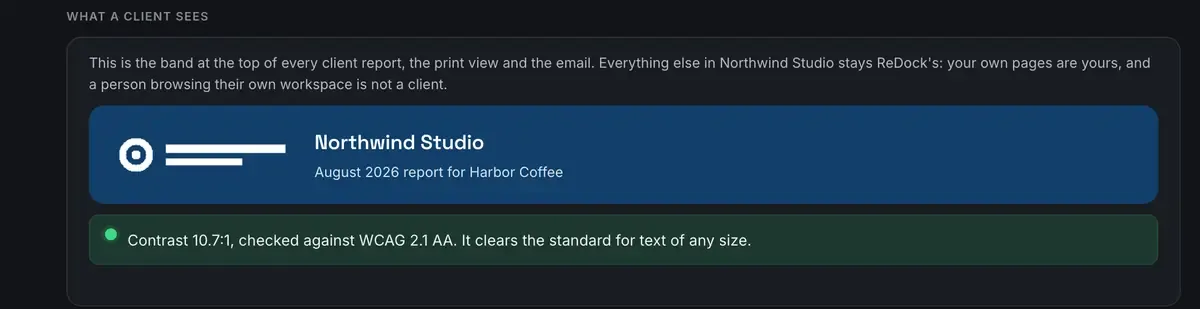
Put your own name, logo and two colours on a client group’s report and it goes out from you. There is no account for them, no sign-in and no link back into ReDock. A colour pair that would put pale text on a pale band is refused with the measured contrast ratio in the message, so nothing unreadable reaches a client.
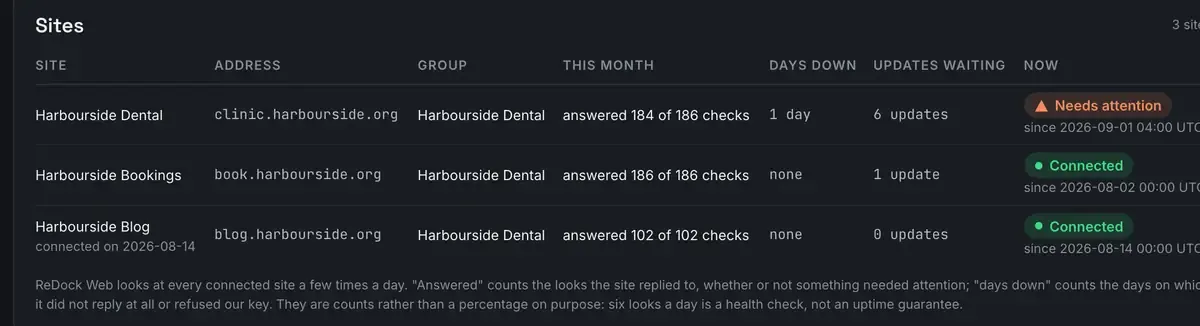
Checks answered and days down per site, the jobs that ran and who queued them, a count of every change by tool, what needs attention today. Built from records made as things happened rather than assembled at the end of the month. Take it as a print view, CSV or JSON, or switch the monthly email on and it goes out on the first.
What it costs
The desktop app is free on every plan, and so is the sharing. On the web side, one connected live site is free, which is enough to try this against a real client site before deciding anything. The pricing page has all four plans with the numbers on them.
When the project is ready to be permanent rather than tunnelled, a one-click Cloudflare deploy with a domain you own takes it there, which deploy a website for free covers.
FAQ
Will the client’s review address stay the same for the whole project?
Yes, if you use one of the three named redock.xyz subdomains. Those keep their name while you use them. The unlimited unlisted links are for quick one-off shares.
Can I run several client sites at once?
Yes, across different stacks, side by side. Each gets its own address and can be shared independently.
Does the demo need my machine to be on?
For a tunnelled link, yes, because it serves from there. Once a project is approved, deploy it so it is up independently of your laptop.
Do I need a paid plan to look after one client’s live site?
No. One connected site is free, with the same dashboard every plan gets. The plans differ by how many live sites a workspace connects and how many people sit in it.
Build it on your own computer with ReDock for macOS or Windows. Look after it afterwards with ReDock Web, where one live site is free: create an account.