Gutenberg MCP: how an AI writes real block content, not HTML soup
Block-native MCP tools let an agent read a page as blocks, patch one, and check the rendered result, so what it writes stays editable in wp-admin.
Gutenberg MCP means giving an agent tools that speak the block editor’s own language: registered block types, theme patterns, and the serialised block markup WordPress actually stores. Not a wall of HTML pasted into a post.
The difference shows the moment a person opens the page in wp-admin. Block-native content is editable. HTML soup is one Classic block you have to untangle.
The HTML soup problem
Ask a raw language model to write a landing page and it will produce HTML. Often decent HTML. But WordPress does not store pages as HTML. It stores them as blocks: structures wrapped in comments like <!-- wp:heading --> that carry attributes the editor understands. The block editor handbook documents the grammar.
Paste model-generated HTML into a post and one of two things happens. It lands as a single Classic block, uneditable as blocks and unstyled by the theme’s block settings, or an importer makes a rough guess at where the boundaries were. Both leave whoever inherits the page worse off. The content exists and the site’s editing model has been bypassed.
The fix is not a smarter model. It is a better tool surface.
What block-native tools look like in use
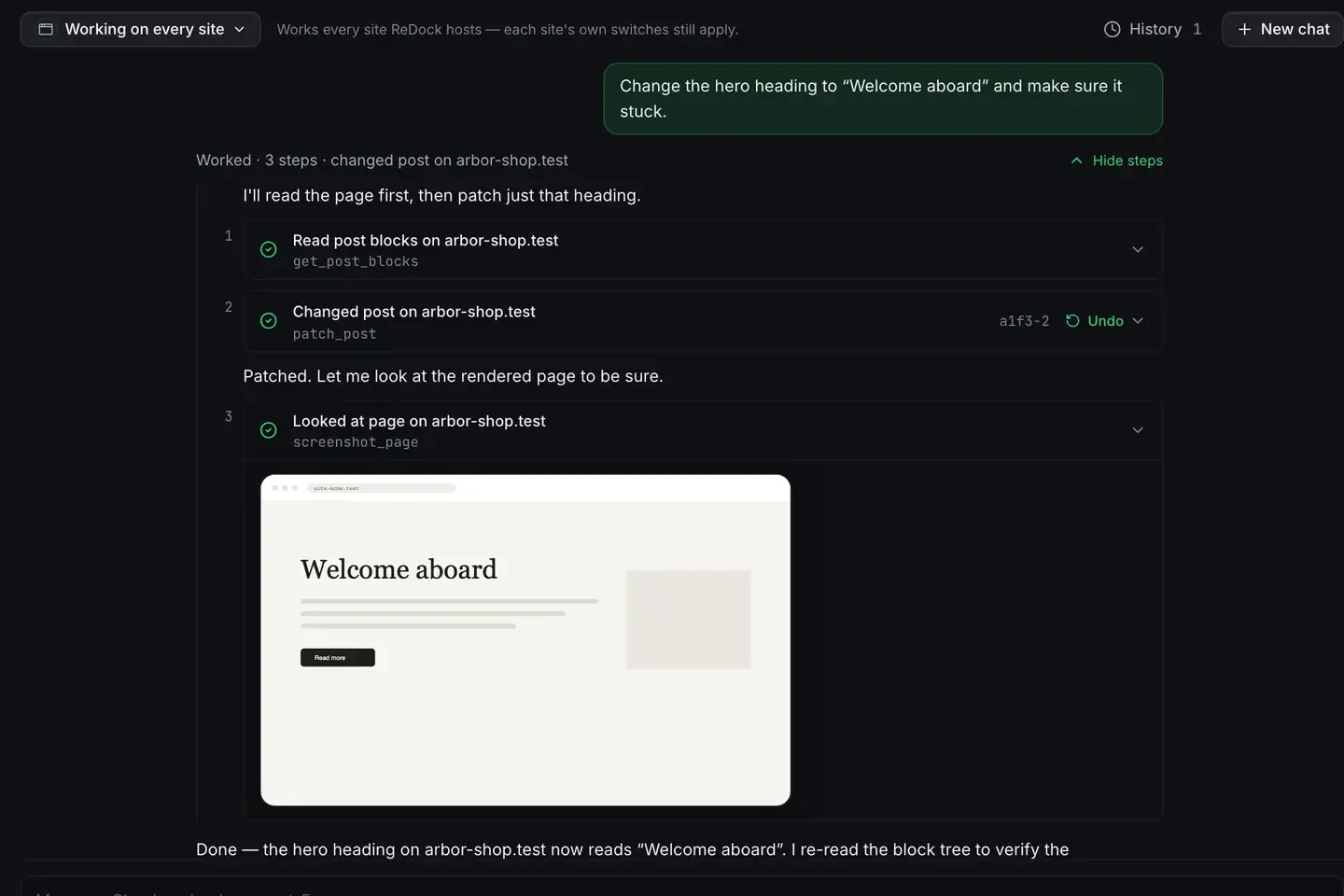
ReDock publishes the whole app as MCP tools on 127.0.0.1:47200, and the WordPress ones are structural on purpose. Here is one ask against a local site: change the hero heading to “Welcome aboard” and make sure it stuck.
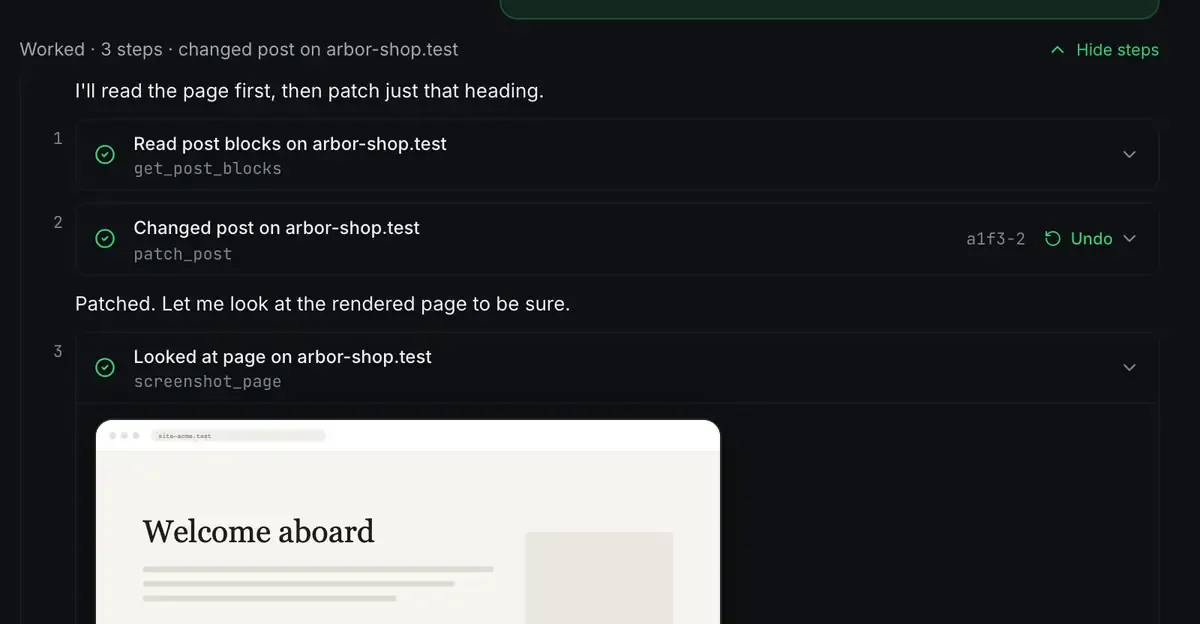
Read the page as a block tree. Patch one block. Look at the rendered page to confirm. The agent never handled a string of HTML, because the tools do not accept one. It composed in the same vocabulary a human editor uses, and the middle step carries an Undo, which is a WordPress revision.
The rest of the surface follows the same shape: the agent can ask which blocks and which patterns the site actually registers before it writes anything, insert a pattern as a unit, and read the rendered output back.
Patterns first, blocks second
The strongest results come from reaching for patterns first. Themes ship curated ones, a hero, a pricing table, a testimonial row, that already carry the theme’s spacing, colours and type. ReDock’s authoring guidance steers the agent to those and then to adjusting content inside them, rather than assembling a page block by block from nothing.
The effect is that pages an agent builds look like they belong to the site, because structurally they do. They also stay editable: a person can open the page and change a heading without archaeology. AI edits your WordPress site goes deeper on the workflow.
Verify, then report
Block-native writing enables something HTML pasting never could. After a patch, the agent reads the tree back and confirms the edit survived, and for visual changes it can look at the rendered page. Every write is a revision, so the undo is WordPress’s own.
That loop matters because models make mistakes. A surface that makes a mistake detectable and reversible is what turns “the AI wrote something” into “the AI made a change I can keep or roll back”.
A hidden anchor is how a place keeps its name
There is one more thing block markup makes possible. On ReDock Web, a pinpoint is a named place on a page the agent can be sent back to. It works because WordPress blocks carry an HTML anchor, the field under Advanced in the block’s own panel.

Reword the paragraph, restyle the section, insert three blocks above it: the anchor moves with the block, so the address still resolves. If a block already has an anchor, ReDock uses that one and writes nothing. A place either carries the mark or it refuses, and a refusal names the site and the pinpoint. A pinpoint that quietly resolved to the wrong block would be worse than one that said no.
What about page builders
Gutenberg is not the only builder ReDock’s agent drives. On a site running Elementor, the agent reads the document’s element tree and patches a widget through Elementor’s own data model, with a version token so a stale read is refused rather than overwriting an editor you left open. Elementor elements carry their own persistent ids, so pinpoints work there too, by element id rather than by anchor.
The two builders store content differently and the tools differ accordingly. Elementor vs Gutenberg in the AI era is the comparison, and the Elementor page has what the adapter does and does not do.
All of this runs against real local WordPress sites, each at a trusted https://name.test address, provisioned in one click with a pinned PHP version and its own MySQL database. No Docker, no terminal. Free local WordPress with real HTTPS explains why local is the right place to let an agent experiment.
FAQ
Will pages the agent writes be editable in the normal block editor?
Yes, and that is the point. It writes the same serialised blocks the editor produces, using the block types and patterns the site actually registers. Open the page in wp-admin and every block is selectable.
Which MCP clients can use these tools?
Any of them: Claude Desktop, Claude Code, Cursor, or anything else that speaks the protocol, pointed at 127.0.0.1:47200. Each client’s setup is in the MCP docs. ReDock also ships its own agent and a catalogue of local models if you would rather not use a cloud model at all.
Does this work with any theme?
The tools read whatever the active theme registers: its block types, its patterns, its design tokens. A theme with a richer pattern library gives the agent more to compose with, and the mechanism works with any block theme.
Is Elementor supported?
Yes. The agent has tools for Elementor documents, and the web adapter means pinpoints resolve on Elementor pages by element id. It edits what Elementor stores rather than driving the visual editor, and a widget with unusual custom storage may still need a manual touch. The receipt says so when that happens.
If you would rather your AI wrote blocks than soup, download ReDock for macOS or Windows. It is free, and the first block-native site is one click away.