WordPress plugin update failed? Read each site's reason, fix that, and retry only the failures
When a WordPress plugin update fails across client sites, ReDock Web gives every site its own sentence saying why, and one button that runs the job again on only the sites that did not finish.
A WordPress plugin update failed notice nearly always comes down to a short list of causes: WordPress could not write the new files, the site ran out of memory halfway, an interrupted update left the site stuck in maintenance mode, or the new version needs a newer PHP or WordPress than the site runs. On one site, you find out by reading the error on the Plugins screen. Across thirty client sites, you need each site’s own reason in one place, and a way to retry only the sites that did not finish. That is how ReDock Web reports a job. This post runs through the usual causes, then reads a job’s rows and retries the failures.
When a WordPress plugin update failed: the usual causes
WordPress could not write the files. An update replaces a plugin’s folder, so the web server needs permission to write there. The tell is WordPress suddenly asking for FTP details, or the same update failing on one host and working on another. File ownership and permissions are the fix, and usually the host’s to make.
The site ran out of memory. A large plugin, a small hosting plan and a PHP memory limit set years ago can add up to a fatal error part of the way through. Raising the limit, or asking the host to, is the fix.
An interrupted update left maintenance mode on. While an update runs, WordPress puts a .maintenance file in the site root and visitors see a message that the site is briefly unavailable for scheduled maintenance. If the update dies before it finishes, the file can be left behind and the site stays that way until somebody deletes it.
The new version needs more than the site has. A plugin declares the lowest WordPress version it works on and the minimum PHP it requires in its own header. A site on an old PHP gets left behind by plugins that moved on, and if that is the pattern across a client’s sites, the PHP version is the real problem.
Working through a dashboard adds two more: whether the dashboard can still reach the site, and whether it could take a way back before changing anything. Those appear in ReDock’s rows as well, in plain words.
The task: read the rows, fix the cause, retry the failures
1. Spot the failed job
The overview’s queue shows recent jobs and their state, so a failed one is visible the moment you sign in.
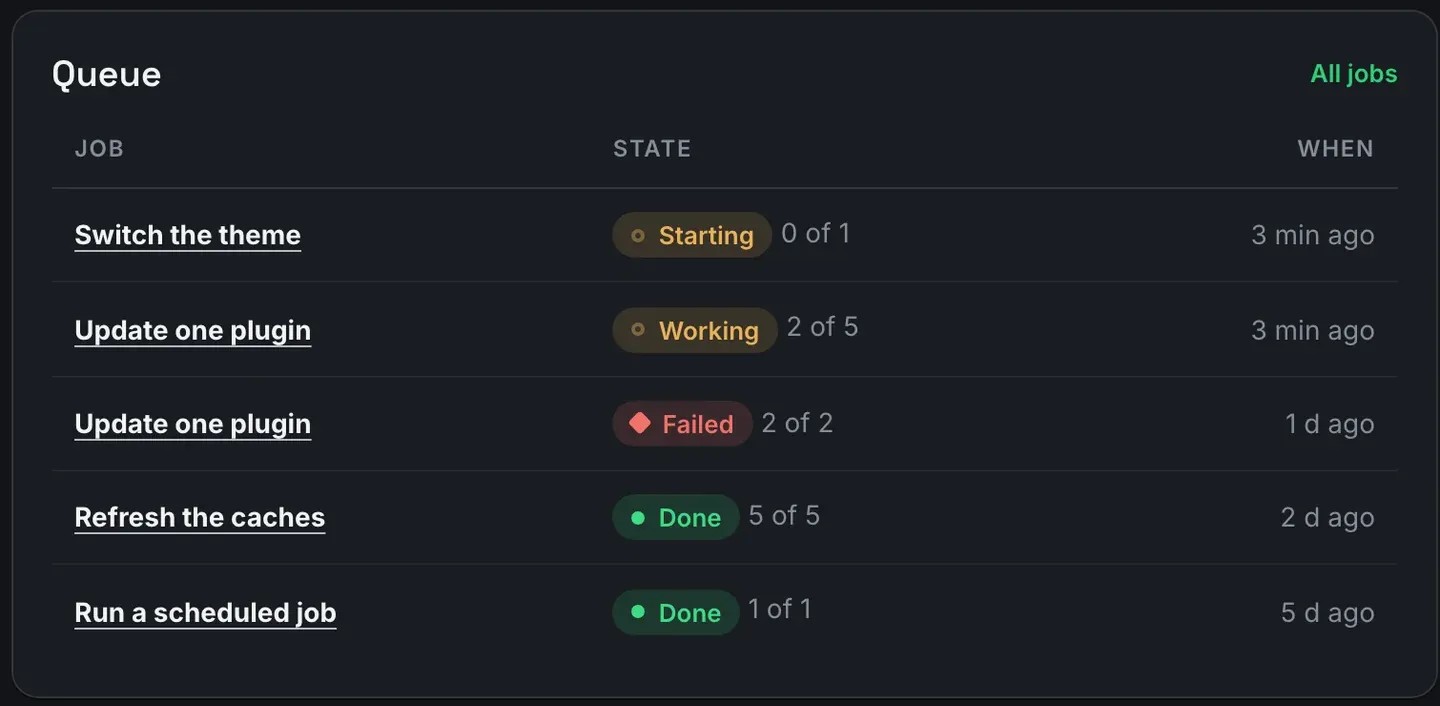
Failed on a job means at least one site in it did not finish, even when the job has worked through every site it was given. The rows say which.
2. Read every site’s own sentence
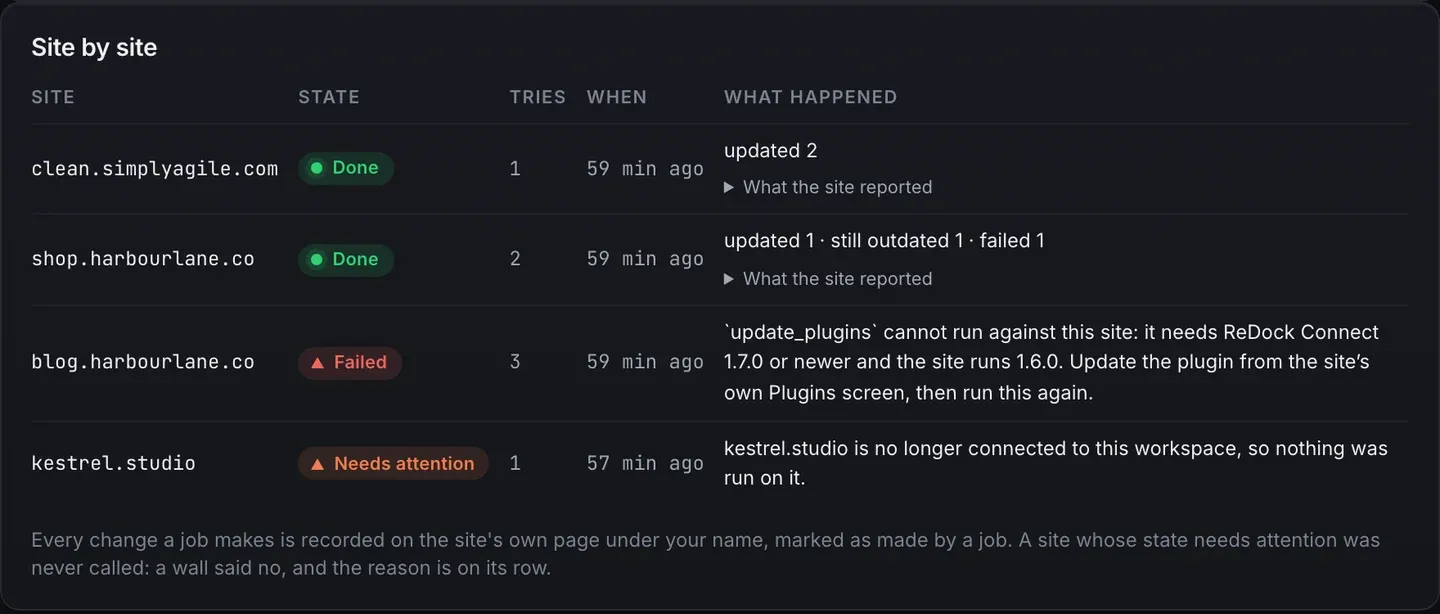
Open the job. Every site has a row with its state, how many tries it took, when, and what happened in the site’s own words. The picture at the top of this post is one such table, and its four rows are four different stories.
updated 2is done.updated 1 · still outdated 1 · failed 1means the site finished its step, but not every plugin moved. One updated, one is still behind, and one failed, after two tries. Done describes the site, and the counts describe its plugins. What the site reported, under the row, has the details in the site’s words.- The third site failed three times with a sentence you can act on. The job needs a newer ReDock Connect than that site runs, so the fix is to update the plugin from the site’s own Plugins screen and run the job again.
- The fourth needs attention because it is no longer connected to the workspace, so nothing was run on it.
You will meet a few other sentences. A plugin the job names that is not installed on a site gets a row saying exactly that, which is a fact rather than a fault. A site that could not make a snapshot is skipped rather than updated, because it would have had no way back. And a site whose health already needed attention is never called by a job at all, with the reason on its row.
None of these needs a log file.
3. Fix what each sentence says
Match each row to its cause before retrying anything, because a retry sends the same request at the same wall.
- A failure inside a finished site: open What the site reported for the plugin’s own error, then check the WordPress causes above.
- A site that needs a newer ReDock Connect: update ReDock Connect on that site first.
- A site no longer connected: pair it again, or leave it out.
- A plugin not installed: nothing to fix. Leave that site out of the next job.
- A site that could not make a snapshot: find out why the copy failed. The job form has a box to update without a snapshot, and leaving it off is the point.
4. Retry only the failures

Run again on the sites that did not finish queues a new job over exactly those sites, and the sites that finished are left alone. It is a job like any other, with its own reference and its own rows. For Update every plugin, each site is asked what has an update waiting as its step runs, so the retry works from what the site has now rather than what it had an hour ago.
If a retry fails the same way, the cause is not a passing one, and the row is telling you what to change.
5. Check the record
Every change a job makes lands on the site’s own page under your name, marked as made by a job, and on Activity with its outcome, failed attempts included. When a client asks why an update did not take, the answer has a date on it.
When the update worked and broke the site
A failed update and a broken site are different problems. When the update goes through and the site misbehaves afterwards, the way back is the snapshot ReDock took first, with one press on the plugin’s row, and safe updates press it for you when a page stops answering properly.
Picking sites and cancelling a job are covered in the bulk plugin update post and on jobs and bulk actions, and the rules are in the jobs guide.
FAQ
Why does a job say Failed when most sites updated?
A job is marked Failed when any site in it did not finish. The rows say which sites, and the button at the top runs the job again on those alone.
Does Run again repeat the whole job?
No. It queues a new job over only the sites that did not finish. The sites that finished are not touched again.
What does a Done row with a failure in it mean?
The site finished its step, but at least one of its plugins did not update. Done is about the site and the counts are about its plugins, and What the site reported shows the site’s own words about each one.
Will a retry update a site that is down?
No. A site whose state needs attention is never called by a job, and the reason sits on its row.
Read a job on your own site
A free account connects one live WordPress site, with jobs, per-site sentences and Run again on it. Queue an update and read the row, and you will know what a failed update looks like before a client has to tell you.
Create a free account and read your first job.