WordPress PHP end of life: find the client sites still on it, and move them this month
When a PHP version reaches end of life it stops getting security fixes, and ReDock Web names every client WordPress site still running one, with the date support ended, and counts down before the date arrives.
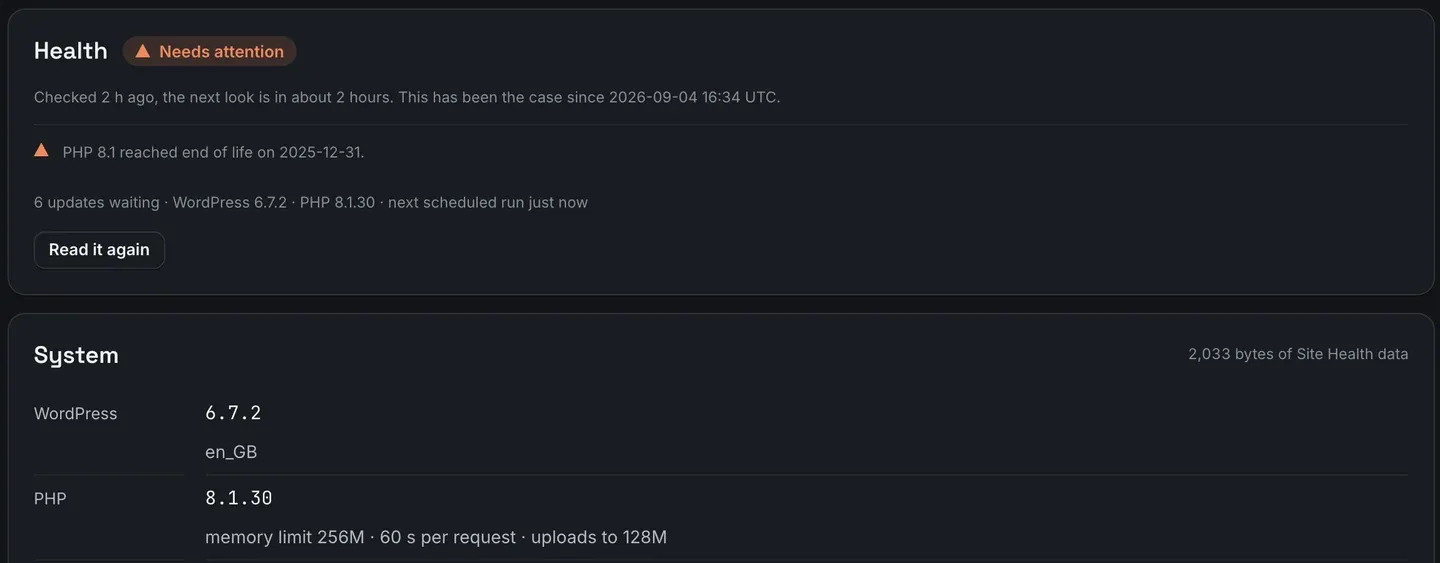
WordPress PHP end of life is the date the PHP version under a site stops getting security fixes, and after it, any vulnerability found in that PHP stays open on every site still running it. As of September 2026, php.net lists 8.1 and everything older as end of life, and 8.2’s security support ends on 31 December 2026. WordPress itself keeps running on those versions, which is exactly why the sites on them go unnoticed. In ReDock Web, a site on an end-of-life PHP is marked as needing attention with the reason and the date, and a site nearing the date counts down before it arrives. This post finds those sites across an estate and walks through moving them.
What PHP end of life means for a WordPress site
PHP publishes its support schedule. Each branch gets two years of active support, then two more of security fixes only, then nothing. The php.net description of that last stage is blunt: a release that is no longer supported, whose users should upgrade as soon as possible because they may be exposed to unpatched security vulnerabilities.
On the day of writing, the schedule reads like this.
| PHP | Security fixes until |
|---|---|
| 8.1 and older | ended (8.1 on 31 December 2025) |
| 8.2 | 31 December 2026 |
| 8.3 | 31 December 2027 |
| 8.4 | 31 December 2028 |
| 8.5 | 31 December 2029 |
WordPress’s requirements page recommends PHP 8.3 or greater. It also says WordPress will still run on PHP 7.4 and later, while warning that versions past their end of life may expose a site to security vulnerabilities. So nothing breaks on the day. The front end looks the same, wp-admin works, and the risk sits there until somebody notices.
The PHP version is rarely the agency’s to change, either. It belongs to the host, and on shared hosting it often stays wherever it was set when the site was built.
The task: find every client site on an end-of-life PHP
1. Read the overview
The first screen after signing in lists the sites that need attention, each with one sentence.
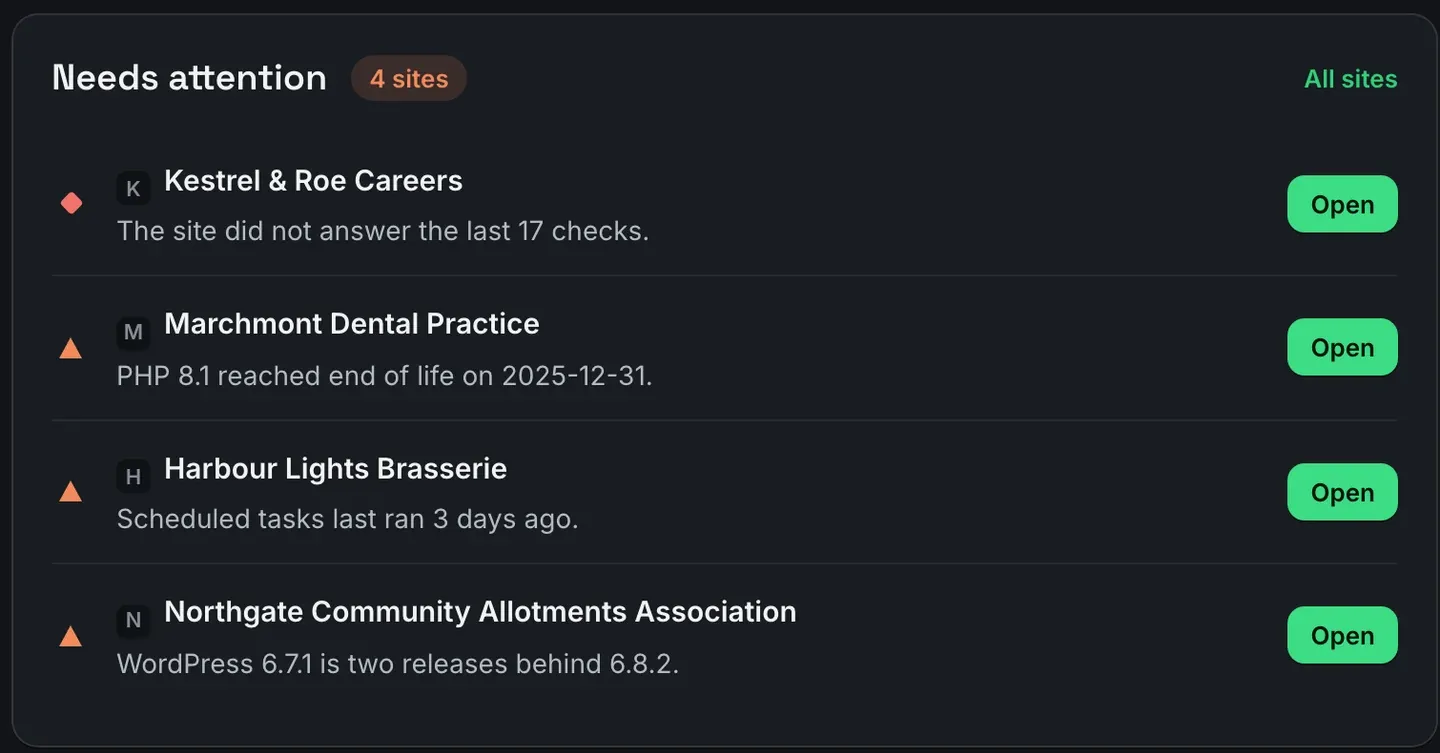
The PHP line names the version and the date its support ended. It sits in the same list as a site that stopped answering and a stalled schedule, because the monitoring treats them all the same way: as reasons with something to do about them, never as a score.
2. Narrow the site list
All sites sorts by what needs attention, so the sites carrying a reason come first.
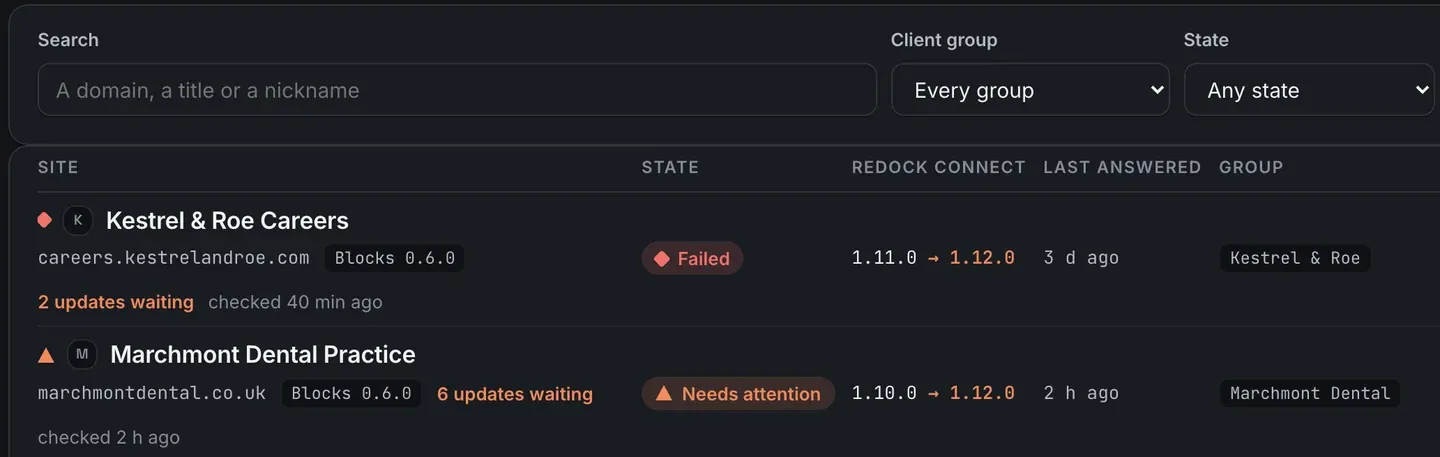
The row tells you the site needs attention and which client it belongs to. The State filter narrows the list to sites in a given state, and the Client group filter narrows it to one client, which is how you build the list for a single conversation with a single host.
3. Open the site and read the numbers
The site’s Health tab carries the reason, and the System card beneath it has the exact version. The picture at the top of this post is that tab for the dental practice: PHP 8.1.30, needing attention since the first check that found it.
The same card shows the PHP memory limit, the time allowed per request and the upload limit. Note them down now. A move to a new PHP version can change those settings, and knowing the old values saves an afternoon later.
4. Plan the move with the host
Changing PHP is usually a setting in the host’s control panel or a ticket to their support. Before you ask for it:
- Check the plugins and theme against the target version. A plugin that has not been updated in years is the likeliest thing to break, and the six updates waiting on this site are worth applying first, with a snapshot behind each one.
- If the host offers a staging copy, move that first and click through the pages that make the client money.
- Aim for a branch with runway. Moving from 8.1 to 8.2 in September 2026 buys under four months.
5. Watch the reason clear
Once the host has moved the site, press Read it again on the Health tab, or wait for the next check. The reason clears on its own, and nothing needs dismissing.
The countdown before the date
A reason does not wait for the day a version ends. As the date approaches, the site’s reason changes from saying support has ended to counting the days left, with the date, so the move can be planned rather than rushed.
That matters right now for PHP 8.2, whose security support ends on 31 December 2026. A client site on 8.2 is already inside that countdown, and a host ticket raised this month is a calm one.
The reasons the monitoring looks for, and how uptime is checked beside them, are in the monitoring guide and on monitoring and health. If a site’s WordPress version needs moving as well, updating core across sites explains the backup rule that job runs behind.
FAQ
Will my WordPress site stop working when its PHP reaches end of life?
No, not on the day. The site keeps running, and WordPress still runs on PHP 7.4 and later. What stops is security fixes for that PHP version, which is why the site needs moving.
Which PHP version should client sites be on?
WordPress recommends PHP 8.3 or greater. On php.net’s schedule, 8.3 gets security fixes until the end of 2027 and 8.4 until the end of 2028, so either gives a site room.
Can ReDock change a site’s PHP version?
No. PHP belongs to the server, and the version is changed by the host or in the host’s control panel. ReDock tells you which sites need it and clears the reason once the move is done.
Does the monthly client report show this?
Yes. The report’s section on what needs attention now carries the reasons as they stand today, so a client whose site is on an end-of-life PHP sees it there too.
Check your own estate
A free account connects one live WordPress site and runs the health checks on it. Connect the site you suspect is on the oldest PHP, and if there is a reason to show, it appears after the first check.
Create a free account and find out which PHP your sites run.