WordPress page speed monitoring for agencies: a weekly phone score for every client site
ReDock Web measures every connected WordPress site's home page on a phone with Google's PageSpeed Insights about once a week, and shows the score, how it moved, and the Core Web Vitals where Google has them.
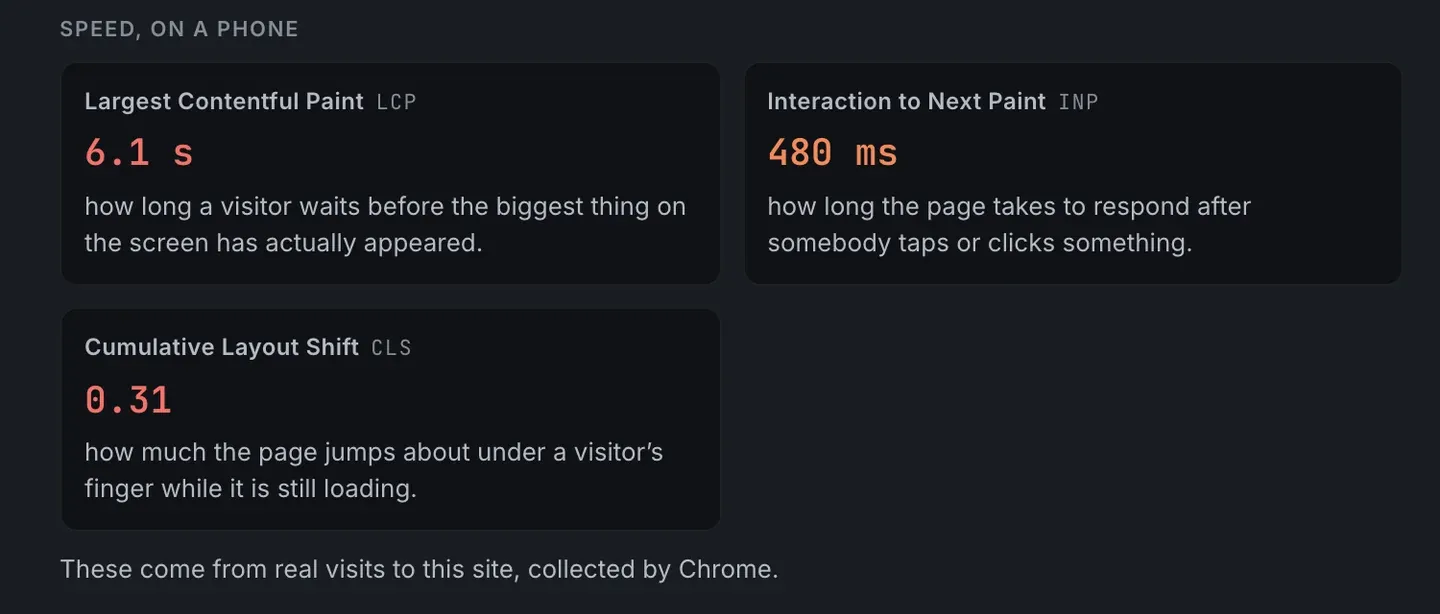
WordPress page speed monitoring for agencies works best as one number per client site, taken the same way every week, with the readings behind it for when you have to explain the number. ReDock Web measures each connected site’s home page on a phone with Google’s PageSpeed Insights about once a week. It shows the score with Good, Needs work or Poor beside it and how the score has moved since the week before. Under the score sit the three Core Web Vitals, from real visits where Google has them and from Google’s own test load where it does not. A week the measurement could not run reads “not checked”, never zero. This post covers what the score and the readings mean, and uses them to decide which client to call first.
The score, and why it is taken on a phone
The score is the PageSpeed Insights score for a phone, and it is the number a client is most likely to have seen somewhere else. That makes it the one worth tracking, even before the details.
Google’s explanation of PageSpeed Insights says where the number comes from and how to read it. The score comes from a lab test run by Lighthouse, and Google calls 90 or above good, 50 to 89 in need of improvement, and below 50 poor.
A single score is a snapshot. The change since last week is what tells you whether something happened, which is why ReDock prints it beside every score.
The three readings, and where they come from
The three readings are the Core Web Vitals. The web.dev page on them gives the thresholds for a good experience, measured at the 75th percentile of page loads:
| Reading | What it measures | Good |
|---|---|---|
| Largest Contentful Paint | how long a visitor waits before the biggest thing on the screen has appeared | 2.5 seconds or less |
| Interaction to Next Paint | how long the page takes to respond after somebody taps or clicks | 200 milliseconds or less |
| Cumulative Layout Shift | how much the page jumps about while it is still loading | 0.1 or less |
The site in the picture at the top of this post misses all three: a 6.1 second wait for the biggest thing on the screen, a 480 millisecond response to a tap, and a layout shift of 0.31.
The line under the readings says where they came from, and that line matters when you talk to a client.
On a site with enough visitors, the readings are Google’s measurements of real visits in Chrome. PageSpeed Insights reports those over the previous 28 days, so a fix shows in them gradually, not the next morning.
On a quieter site, Google has too few real visits to report. The first and last readings then come from Google’s own test load of the page, and Interaction to Next Paint reads no reading, because it can only be measured from real visits.
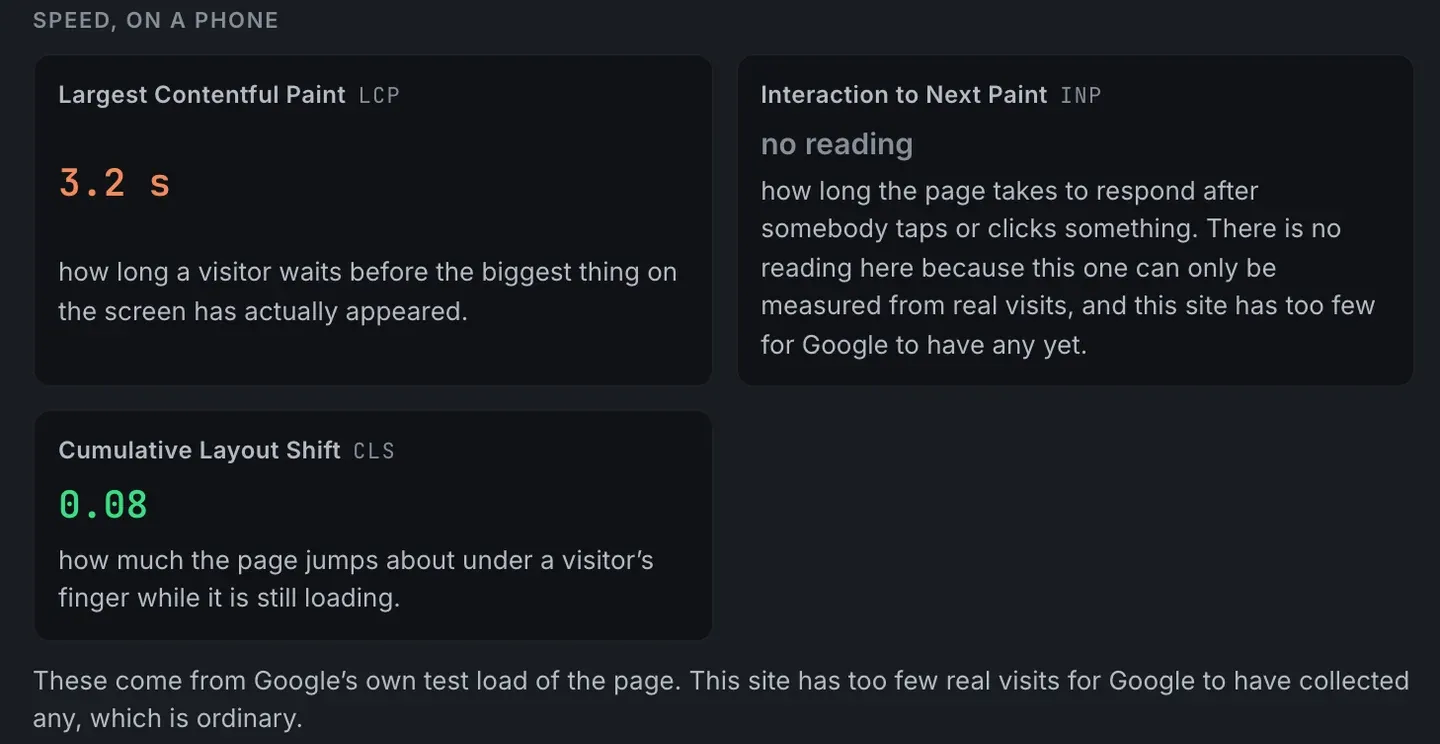
ReDock leaves that gap empty rather than filling it with a number from somewhere else. Telling a client their responsiveness is fine, when nothing measured it, would be telling them something untrue.
The task: decide which client to call first
1. Open Mail and speed
It is under Work in the sidebar. Every site has a line with its state, its speed score and the change since last week.
2. Sort your attention by change, then by score
A site that dropped sharply this week is news. Something changed, and somebody at the client may already have noticed. A site that has sat at Poor for months is a standing fact that belongs in a planned conversation rather than an urgent one. And a score that rose after work you did is a line for the monthly email.
3. Open What was found
Under the site, the mail records come first and the speed readings follow. Read which of the three readings is failing before you think about the score, because each one points at a different kind of fix.
4. Match the reading to where to look
Each reading’s own definition says roughly where to start:
- Largest Contentful Paint is about the biggest thing on the first screen and how long it takes to arrive. On WordPress sites that is often a large hero image or slider, or a slow first answer from the server.
- Interaction to Next Paint is about how busy the page keeps the phone. Heavy scripts are the place to start: chat widgets, trackers, and plugins that load everywhere whether the page needs them or not.
- Cumulative Layout Shift is about things arriving late and pushing content down, such as images with no set size, banners that load after the text, or fonts swapping in.
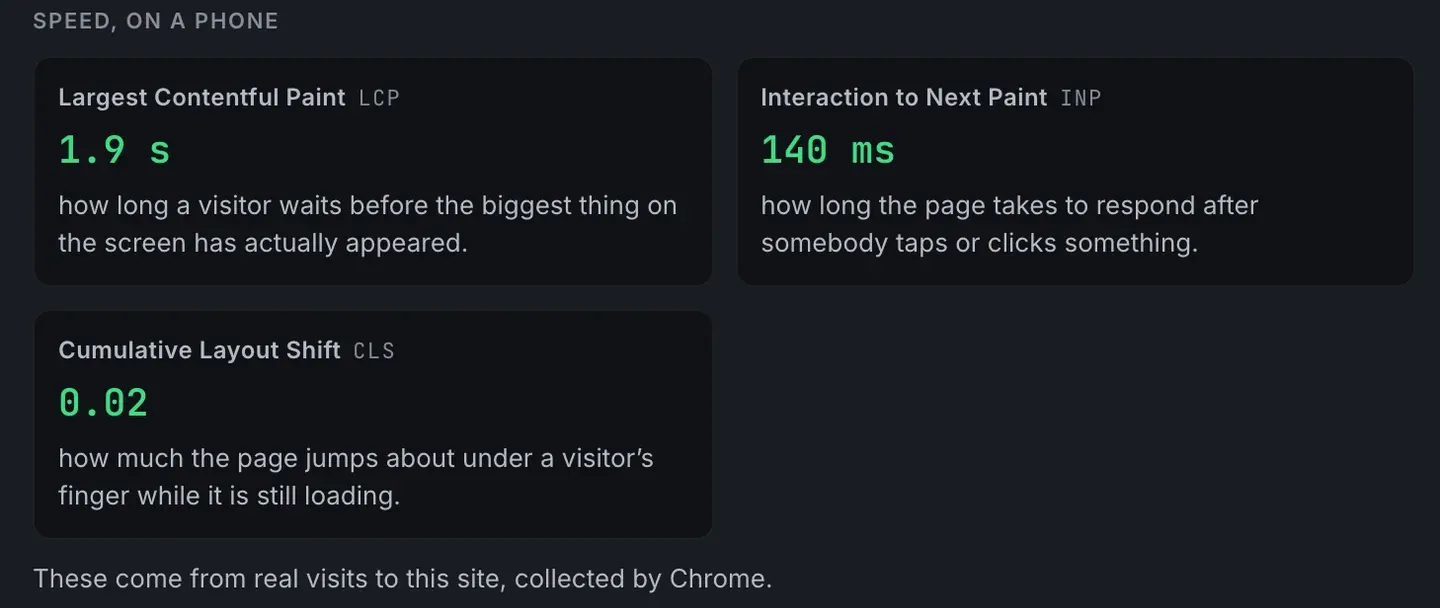
Compare the site at the top with one in good shape:
5. Watch the next weekly look
After a fix, the next weekly look shows the new score. Readings from real visits catch up as the 28 days roll forward, so tell the client that before they check for themselves.
What the check does not do
It measures the home page only, on a phone, about once a week, and it changes nothing on the site. If the measurement could not run in a given week, the score reads not checked, and the mail records are read either way. A newly connected site shows Waiting until its first look, which comes on its own within five days of pairing.
The readings and their sources are described in the mail and speed guide.
FAQ
Can I monitor Core Web Vitals on multiple sites at once?
Yes. Every connected site gets the weekly phone score and the three readings on the same page, with the change since last week beside each score.
Why does a site show no reading for Interaction to Next Paint?
That reading can only come from real visits, and Google does not have enough of them for that site. ReDock shows the gap rather than a number from somewhere else.
What does not checked mean?
The measurement could not run that week. The score reads not checked rather than zero, so a missing measurement is never mistaken for a slow site.
Is every page on the site measured?
No. The home page is measured, on a phone.
Measure one site this week
A free account connects one live WordPress site, and its first phone score arrives on its own within five days. Connect the client who last forwarded you a speed test.
Create a free account and have next week’s number before they ask for it.