WordPress database cleanup across multiple sites: count first, then delete
A WordPress database cleanup in ReDock Web counts seven kinds of leftover rows on every site you name before it deletes anything, counts again before it clears, and skips any site whose numbers moved.
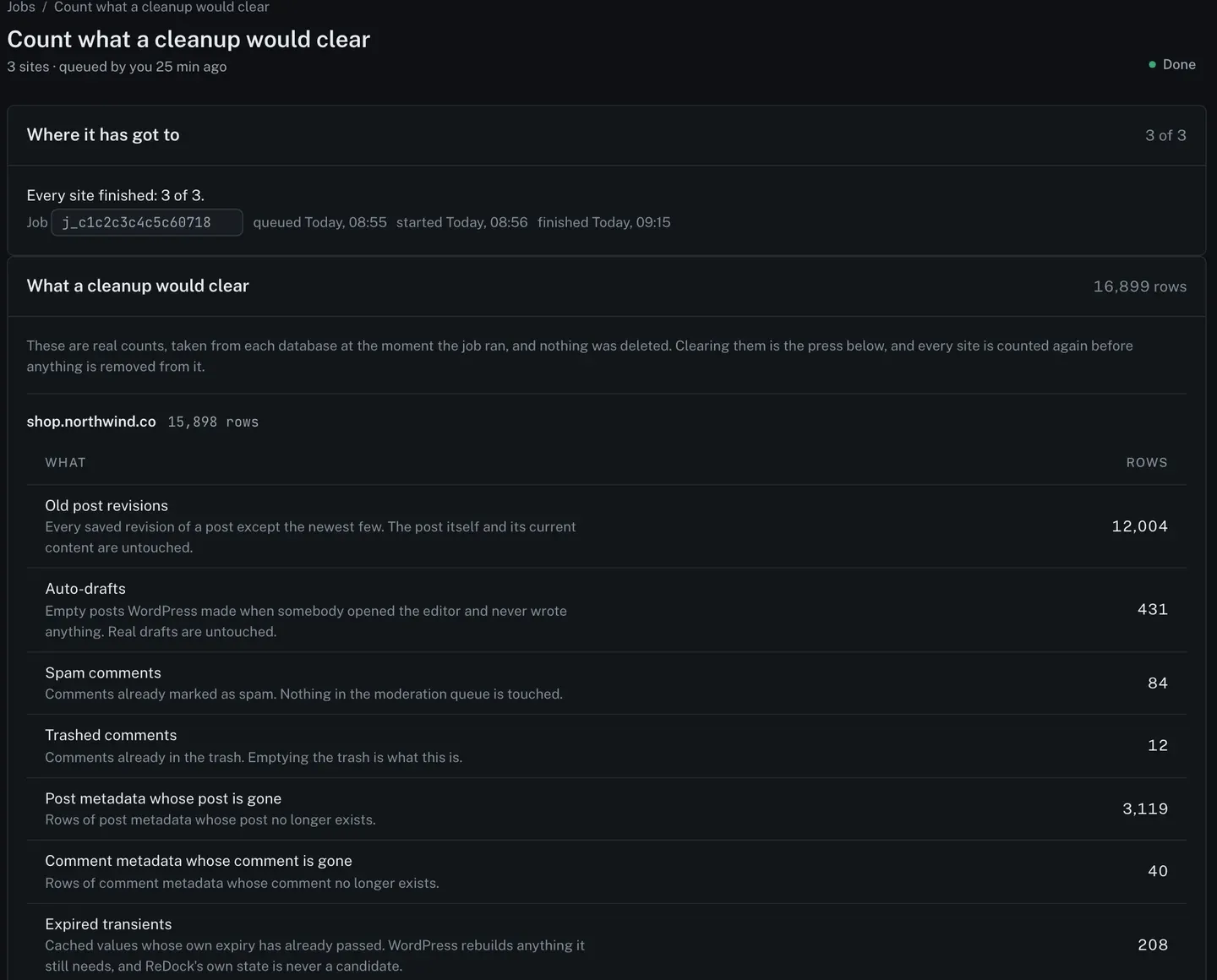
A WordPress database cleanup removes the rows a site piles up and never needs again: old post revisions, auto-drafts nobody wrote, spam that was caught and kept, metadata left behind by deleted posts, and cached values that have expired. Done carelessly, it is also one of the few routine jobs that can delete something a client wanted, with no undo. ReDock Web splits it in two. A first job counts what a cleanup would clear on every site you name, and deletes nothing. A second press, from that job’s page and against those numbers, clears the rows. Every site is counted again before its rows go, and a site whose numbers moved a long way is skipped. This post runs it across a client’s sites.
What a WordPress database cleanup actually removes
These are the seven kinds ReDock counts, and what each one leaves alone.
- Old post revisions. Every saved revision of a post except the newest five. The post and its current content are untouched. WordPress keeps revisions by default, and
WP_POST_REVISIONSis the setting that limits or disables them, which is why a busy site can carry tens of thousands. - Auto-drafts. Empty posts WordPress made when somebody opened the editor and never wrote anything. Real drafts are untouched.
- Spam comments. Comments already marked as spam. Nothing in the moderation queue is touched.
- Trashed comments. Comments already in the trash.
- Post metadata whose post is gone.
- Comment metadata whose comment is gone.
- Expired transients. Cached values whose own expiry has already passed. WordPress rebuilds anything it still needs, and ReDock’s own state is never a candidate.
Nothing on that list is content a visitor sees. That is deliberate, and it is also the limit: this is housekeeping, not a fix for a slow query or a bloated options table.
Count first, across the client
1. Queue the count
Open Jobs, choose Count what a cleanup would clear under What to do, and tick the client’s sites, which the picker groups under the client’s name. The count deletes nothing. Each site is asked how much of each kind it carries, and the numbers come back on the job’s own page.
2. Read the numbers
The picture at the top of this post is that page for a three-site client. The total sits beside the heading, 16,899 rows, and each site has its own breakdown. On the shop, 12,004 of those rows are old revisions.
The line above the numbers is the promise: these are real counts taken from each database when the job ran, nothing was deleted, and every site is counted again before anything is removed from it.
Then delete, against those numbers
3. Press Clear, on the count
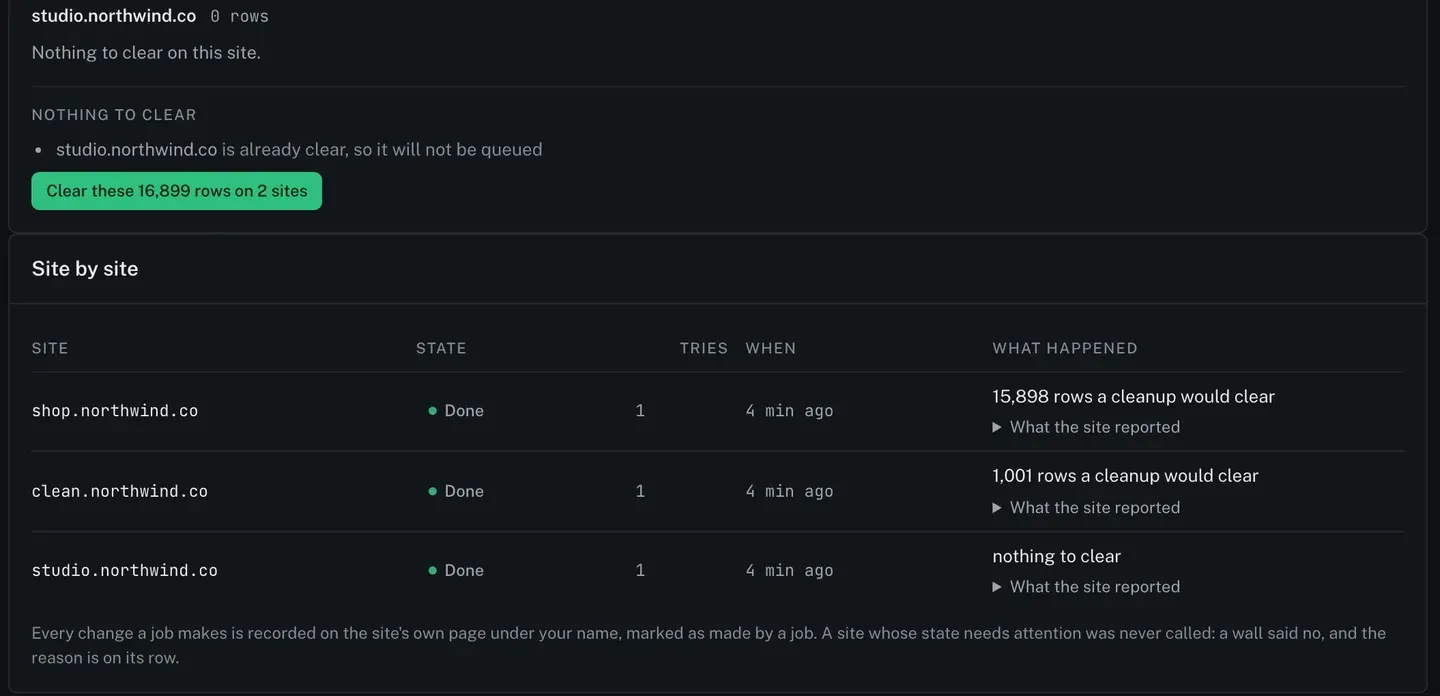
The clearing press lives on the count job’s page, and it carries the numbers you have just read. A site with nothing to clear is named and left out, so the clearing only touches the sites that need it.
4. Answer the question
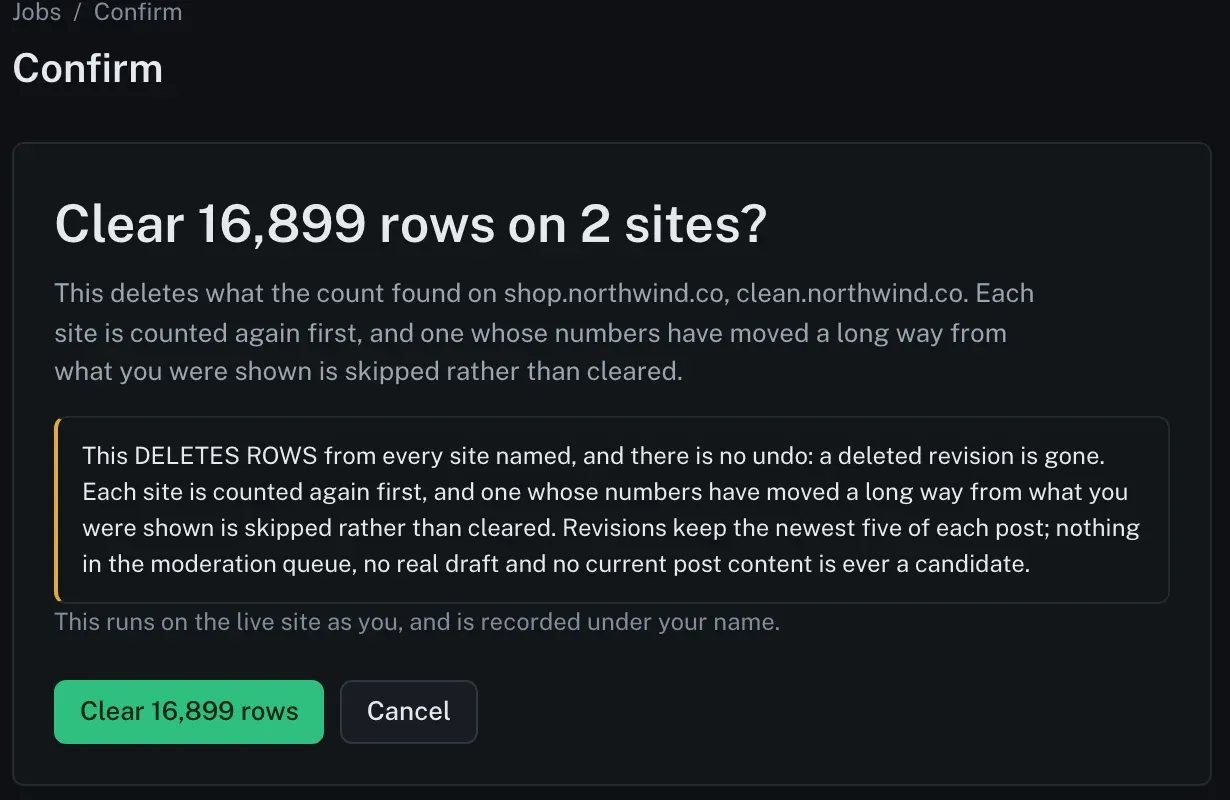
Read the highlighted paragraph properly, once. This deletes rows and there is no undo: a deleted revision is gone. Each site is counted again first, and one whose numbers have moved a long way from what you were shown is skipped rather than cleared. If a site had a busy morning of edits between your count and your press, it sits this one out instead of being cleared against a picture that is no longer true.
The revision rule is worth knowing before a client asks. The newest five revisions of every post stay. If your team relies on putting an older revision back, anything older than those five is gone after a cleanup.
5. Watch it finish
The clearing reports site by site like any other job. Each change it makes is recorded on the site’s own page under your name, marked as made by a job.
One site, one kind at a time
For a single site, the Database section under its Manage tab counts the same seven kinds and gives each one its own button.
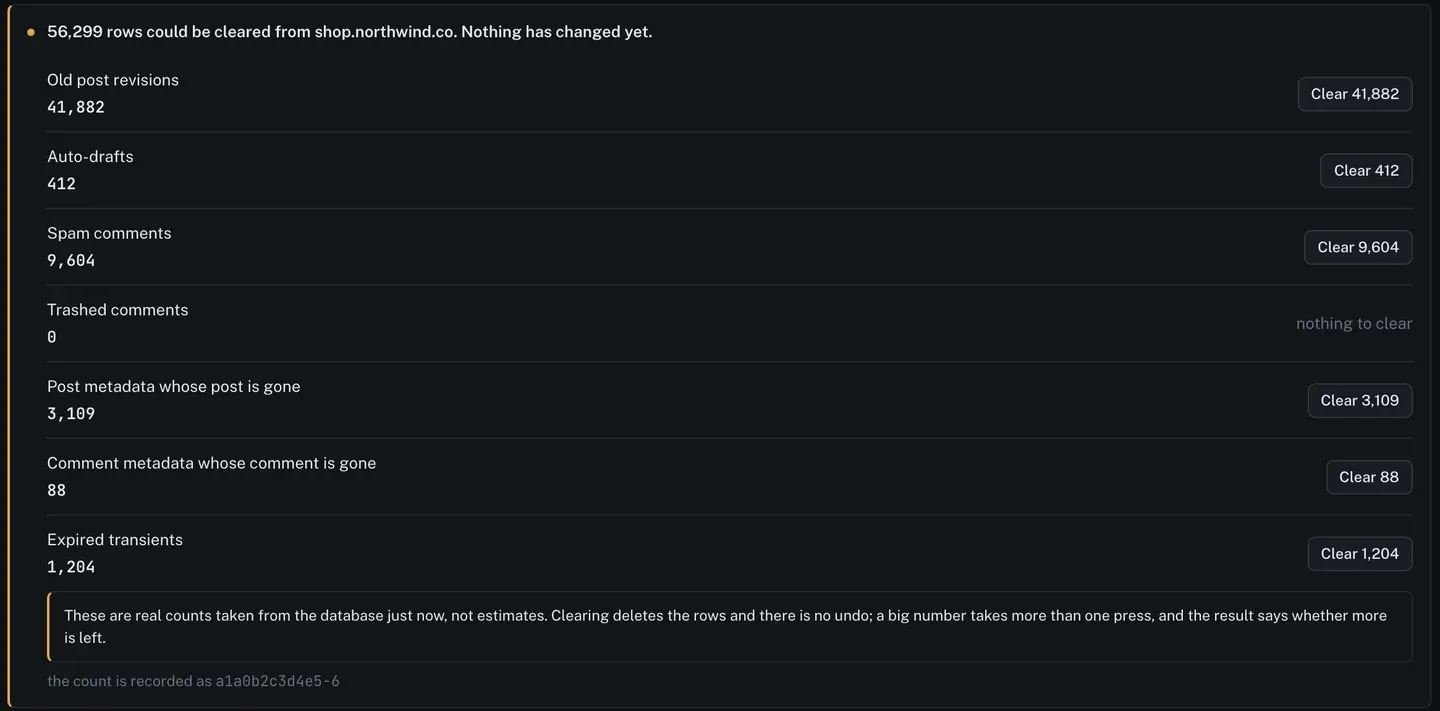
That is the better tool when you want to clear spam and leave revisions alone for now, or when a client has asked for exactly one thing. Clearing revisions never also clears comments. A big number can take more than one press, and the result says whether more is left.
Before you clear anything
This cleanup has no way back inside the job. The way back is the full archive ReDock Web copies to your own Google Drive every day; if a site matters and you are unsure, check that today’s copy is there before you run it, or take one with your host first. The kinds above were chosen so that no content a visitor sees is ever a candidate, and the count exists so the decision is made with the numbers in front of you.
The queue this runs on is described on jobs and bulk actions and in the jobs guide.
FAQ
Does counting change anything on the site?
No. The count job deletes nothing. Clearing is a separate press on the count job’s page, and every site is counted again before its rows are removed.
How many revisions are kept?
The newest five of each post. The post itself and its current content are never candidates.
What if a site changed after I counted?
It is counted again before clearing. If its numbers have moved a long way from what you were shown, it is skipped rather than cleared.
Can I clear one kind of row and leave the rest?
On one site, yes: the Database section has a Clear button for each kind. The job across several sites clears what the count found.
Count one site
A free account connects one live WordPress site, with the count and the Database section on it. Run the count, read the numbers, and decide with them in front of you.
Create a free account and count your first site.