A WordPress management API token for your agency's own scripts
A WordPress management API token in ReDock Web lets your own scripts reach client sites at a level you choose, for one site or every site, and stops working on its very next call once you revoke it.
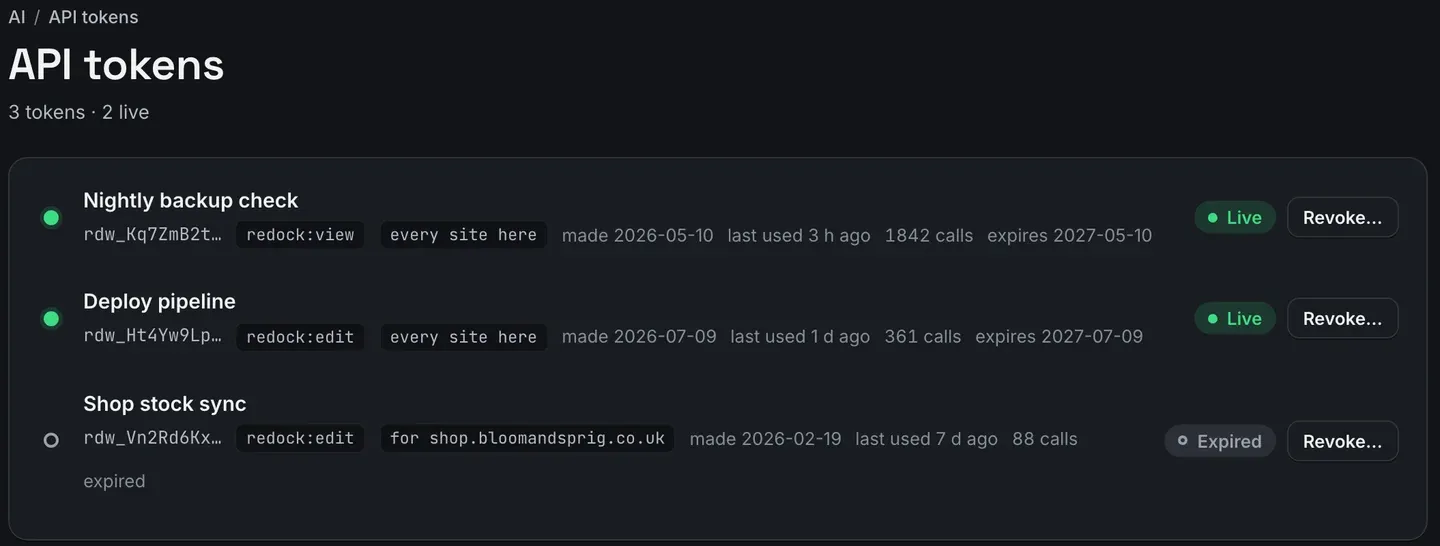
A WordPress management API token is a credential for software rather than a person: the deploy script, the nightly check, the internal dashboard your agency built for itself. Software has no browser, so it cannot sit through a sign-in page. In ReDock Web you make a token on the API tokens page with a name, a level, the sites it may reach and an expiry. It is shown once. Your script sends it as a bearer token to the same door AI apps use, or to the four export files, and when you revoke it, its very next call is refused. This post makes a token, pulls the activity export with it, and revokes it.
Why a WordPress management API token and not an application password
WordPress has shipped application passwords since version 5.6, sent with Basic authentication over https. For one site they are the right tool. Each one belongs to one WordPress user on one site and acts with that user’s capabilities there.
An agency script that touches thirty client sites needs thirty of them, stored somewhere, each able to do whatever its user can do, and each revoked on its own site when the script is retired. Nobody keeps that list tidy for long.
A ReDock Web token is one credential for one job. It carries a level that caps what it may do, it reaches every site in the workspace or exactly one, and it lives on one page with a Revoke beside it.
What a token is allowed to be
Four things are set when it is made.
- A name. Name it after the job, because the name is how you will recognise it on the list in six months.
- A level. The same four levels an AI app is offered: View, Draft, Edit and Full. A script that only reads exports wants View.
- Which sites. Every site in the workspace, or one of them.
- An expiry.
The sentence under the form is the one to remember. A token acts as you, with your role in the workspace as it stands on each call, and never above the level you picked. If you leave the workspace or your role changes, the token loses exactly what you lose, on its very next call. A token meant to outlive a person should be made by the owner.
The task: make one, use it, revoke it
1. Make the token
Open API tokens and use the Create a token form under the list.
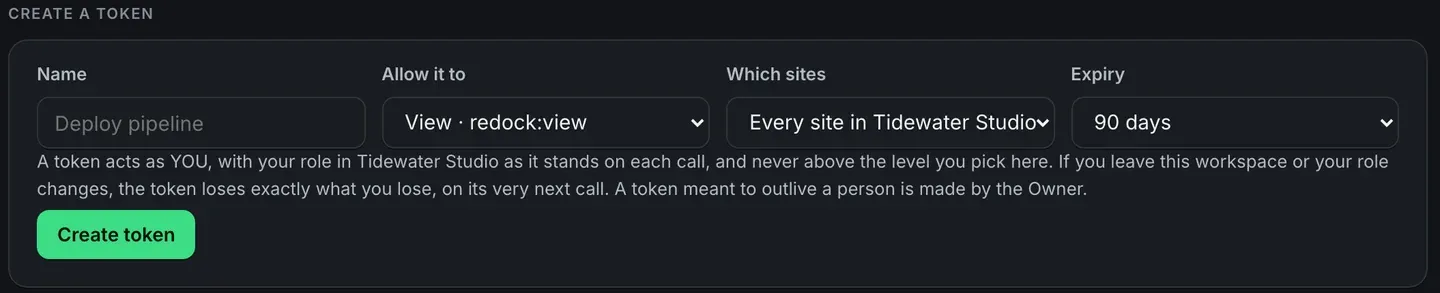
For this task, name it Monthly export, set the level to View, leave it on every site, and give it 90 days. Press Create token.
2. Copy it now

The secret is on screen once. ReDock Web keeps only a fingerprint of it, so not even ReDock can show it to you again. Put it straight into your secrets store or your CI’s secret settings. If it gets lost, revoke it and make another.
3. Use it against the export
The bottom of the page says how a token is used.

Send it in the Authorization header, which is how RFC 6750 describes using a bearer token. For the activity export:
curl -H "Authorization: Bearer $REDOCK_TOKEN" \
  -o activity.csv \
  "https://app.redock.xyz/activity.csv"
The four export files are /activity.csv, /activity.json, /reports.csv and /reports.json. For a narrower pull, set the filters you want on the Activity page and copy its Download CSV link. The filters travel in that address, so your script asks for exactly the view you built. A download carries at most 10,000 rows for the dates picked.
The same token also speaks MCP at https://app.redock.xyz/mcp, or at one site’s own address when the token is for one site. There it reaches the same tools an AI app reaches, at the level on the token and under the same usage policy.
4. Watch it on the list
The list at the top of the page is the token’s own history: its prefix, level and reach, when it was made and last used, how many calls it has made, and when it expires. An expired token stays on the list marked Expired, which gives an old script that failed overnight an obvious explanation.
5. Revoke it
Press Revoke beside it. The next call is refused. Not at the top of the next hour, and not when some session happens to expire.
Where its work shows up
A change a token makes is written to the activity log beside the changes people, jobs and AI apps made, and a call a wall refused is on the same page with its code. That is the reason to route scripts through the door rather than around it: the record you hand a client includes what your own automation did. Reading that log has its own post.
The details are in the tokens section of the AI access guide, and the door itself is on AI access and policy.
FAQ
Is this a general REST API for WordPress?
No. A token reaches two things: the MCP door, where it can call the same tools an AI app can, and the four export files. Those are the two places it works.
Can a token be limited to one client’s site?
Yes. Choose that site under Which sites and use the site’s own address. The rest of the workspace does not exist for that token.
What happens to a token when the person who made it leaves?
It loses what they lose, on its next call. If a token has to keep working after somebody leaves, the owner should be the one who makes it.
How is a token different from connecting an AI app?
An AI app signs in through a browser and a consent screen, and a token is for software that cannot. Both go through the same door, under the same usage policy, into the same records. Connecting an app is covered in managing WordPress sites with Cursor.
Make a token for one site
A free account connects one live WordPress site, with API tokens and both exports on it. Make a View token, point curl at the activity export, then revoke the token and run the same command again to watch it refused.
Create a free account and make your first token.