SPF, DKIM and DMARC for WordPress sites: check mail deliverability across every client domain
ReDock Web reads each connected WordPress site's SPF, DKIM and DMARC records from public DNS about once a week, counts SPF lookups against the limit of ten, and says in a sentence what to fix.
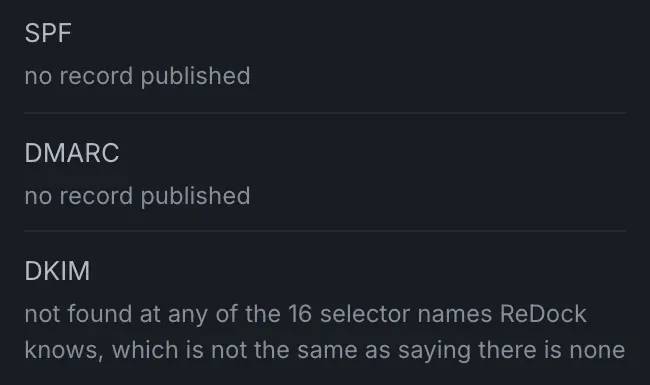
SPF, DKIM and DMARC decide whether the mail a WordPress site sends is believed by the servers receiving it, and every one of them can be read from outside through DNS. To check WordPress mail deliverability across client sites, ReDock Web reads each site’s records through public DNS about once a week. It counts SPF lookups through every include against the limit of ten, reads the DMARC policy, and looks for a DKIM key at the sixteen selector names it knows. Every problem comes with a sentence saying what it means and which record to add or change. The check asks the site itself for nothing, so it works even while the site is down. This post puts each record in one sentence, covers the three mistakes that catch most domains, and reads one client’s results.
If the complaint is that mail never arrives at all, start with WordPress email not sending, which separates a site that failed to hand a message over from one whose message was refused. This post is about the records that decide whether a receiver believes the mail once it arrives.
The three records, one sentence each
SPF is a TXT record on the domain listing the servers allowed to send mail as that domain.
DKIM is a signature on each message, checked against a public key the sender publishes in DNS under a selector name of its choosing.
DMARC is a TXT record at _dmarc on the domain that tells receivers what to do with mail that fails SPF or DKIM, and where to send reports about it.
When a client domain gets these wrong, it tends to be in one of three specific ways.
Mistake one: an SPF record past its lookup limit
Google’s guide to setting up SPF, read on 2026-09-11, puts the limit plainly: an SPF record can have up to 10 include: tags. The rule underneath counts DNS lookups, and an include that points at another record full of includes spends lookups of its own, so a record with five includes can cost fourteen.
That is the record that fools people. It looks tidy and correct, but past the limit a receiving server gives up on it and it protects nothing.
ReDock follows every include to count. For a record that has gone over, the sentence under it gives the number of lookups against the limit of ten and explains the consequence: over the limit a receiver gives up and the record stops protecting anything, “which is why this breaks mail without looking broken”. Then it says what to do: remove an include, or flatten the ones you control into ip4 ranges. If a chain is too long to follow to the end, the count says “at least” and warns that the real number may be higher.

One common way a record gets there is history. A newsletter tool, a helpdesk and a CRM each asked for an include over the years, and nobody took them out when the client stopped using them.
Mistake two: DMARC left at p=none
Google’s guide to setting up DMARC, read the same day, names the three actions a DMARC policy can ask for. none delivers the message and logs it in a daily report, quarantine sends it to the recipient’s spam folder, and reject refuses it. Google recommends starting at none, learning from the reports how your mail is authenticated, and moving to quarantine or reject over time.
The mistake is stopping at the start. A domain still at p=none a year later is still asking receivers to deliver forged mail. ReDock’s sentence for it says that p=none only monitors, that a receiver is told to report on forged mail and deliver it anyway, and to read a few weeks of reports and then move it to p=quarantine.
A domain with no DMARC record at all gets a different sentence. Nothing tells a receiver what to do with mail that fails its checks, and nobody is sent a report about it. The sentence then gives the TXT record to add at _dmarc on the domain, starting at p=none with your own reporting address in place of the one shown.
For a subdomain with no DMARC record of its own, ReDock looks one level higher, the way a receiving server does, and the page says which name answered.
Mistake three: deciding DKIM is missing
DKIM cannot be proved absent from outside. The selector name is chosen by whatever sends the mail and only announced inside the messages, so a check can only say it did not find a key at the names it tried.
ReDock tries sixteen selector names and says exactly that, as the picture at the top of this post shows: not found at any of them, which is not the same as saying there is none. To be certain, open a message the site sent, read the s= value in its DKIM-Signature header, and check that name.
The task: check one client’s domains
1. Open Mail and speed
It sits under Work in the sidebar. Each site has a line with its state and its phone speed score, and the mail records are inside.
2. Open What was found
Under a site, the mail records come first, for the domain named, then the speed readings. A site that publishes nothing looks like the picture at the top: no record for SPF or DMARC, and the careful DKIM line.
3. Fix in the order that changes most
- SPF first. Publish one if there is none. If there is one, get it under the limit before adding anything else to it.
- DMARC at p=none, with a reporting address somebody actually reads.
- DKIM from the sending service’s own settings, then check the selector from a real message.
- Tighten DMARC once a few weeks of reports show nothing legitimate failing.
DNS belongs to whoever holds the client’s domain, and that is not always the agency. The sentences ReDock writes are the ones to paste into that email.
4. Let the next look confirm it
Once the DNS has changed, the next weekly look shows the result. A newly connected site waits for its first look, which comes on its own within five days of pairing.

Here is a domain where somebody did the work:

Two lookups of the ten, DMARC past the monitoring stage, a key where the sender said it would be, and nothing to fix.
Every check and every sentence is described in the mail and speed guide.
FAQ
Does ReDock need access to the domain’s DNS?
No. It reads what the domain publishes through public DNS, the same way a receiving mail server does. Changing a record still happens wherever the domain’s DNS is managed.
How often are the records checked?
About once a week, from outside. A newly connected site gets its first look within five days of pairing.
Why start DMARC at p=none if it lets forged mail through?
Because the reports are how you find every service that legitimately sends as the domain. Moving to quarantine before you know them all can send a client’s own invoices to spam. Google’s guide recommends the same order.
Does finding a DKIM key mean messages are signed with it?
It means a key is published at that selector name. Which selector a message was actually signed with is in that message’s own DKIM-Signature header, which is the check to make when it matters.
Check one client’s domain
A free account connects one live WordPress site, and its mail records are read from outside within days. Connect the client whose invoices keep landing in spam.
Create a free account and read what their domain publishes.