WordPress email not sending: work out which half is broken
WordPress email not sending is two faults wearing one symptom. How to tell whether the site failed to hand the message over or the receiver refused it.
WordPress email not sending is two different faults wearing one symptom. Either the site never managed to hand the message to a mail server, which shows up as an error the site could log, or it handed it over fine and the receiver put it in spam or dropped it, which the site cannot see at all. Almost every wasted afternoon on this problem comes from treating the second as the first. This post separates them, gives the checks for each, and shows what an estate-wide view of both looks like.
Half one: the site never sent it
By default wp_mail() hands the message to PHP’s mail() function, which hands it to whatever local mail transfer agent the server runs. The function reference spells out that chain, and every link in it can be missing.
On modern hosting, it usually is. Plenty of hosts run no local MTA at all, or block outbound port 25 entirely, because a shared server that can send mail freely is a shared server that sends spam.
What it looks like: password reset emails never arrive, contact form plugins report a failure, WooCommerce order confirmations do not appear anywhere including your own inbox.
How to check: the wp_mail_failed action fires with a WP_Error when the handoff fails. A snippet that logs it, or any SMTP plugin with a debug log, will tell you in one attempt. From the command line, wp eval 'var_dump( wp_mail( "you@example.com", "test", "test" ) );' returns false when the handoff failed.
How to fix it: stop using mail(). Send over authenticated SMTP to a service that exists to deliver mail. That is one plugin and four settings, and it moves you out of this half of the problem entirely.
Half two: it sent, and the receiver refused it
This is the harder half, because the site thinks everything worked. wp_mail() returned true. The message left. Somewhere at Google or Microsoft, it was scored and binned.
Three DNS records decide most of that.
SPF is a TXT record listing who may send mail as your domain. Without one, a receiver has no list at all and is free to treat every message as forged. With one, there is a limit people trip over: RFC 7208 caps the DNS lookups an SPF record may cause at ten, and going over it is a permanent error, which means an SPF record with five include: statements chained through other people’s records can fail while looking perfectly reasonable.
DKIM is a signature on the message, with the public key published in DNS at a selector name. The selector is chosen by whatever sends the mail and is announced inside the message headers, so you cannot fully prove DKIM is absent from outside. You can only say you did not find it at the names you tried.
DMARC ties the two together and tells receivers what to do with mail that fails. It also turns on reports, which are the only way you ever find out who is sending as your domain. Starting at p=none changes nothing about delivery and starts the reports arriving, which is why it is the right first move rather than a cautious one.
How to check by hand:
dig +short TXT example.com
dig +short TXT _dmarc.example.com
The first shows the SPF record if there is one. The second shows DMARC. Send yourself a message and read the Authentication-Results header on what arrives; it will say spf=pass, dkim=pass and dmarc=pass or tell you which failed.
WordPress email not sending, watched across every site
Doing that per site is fine. Doing it for thirty client sites, again next quarter after somebody changes a DNS record, is not.
ReDock Web watches both halves.
The site’s own side turns up as a health reason, in the same list as the certificate and the schedule:

Twenty-three failed sends in a day, with the last error the site recorded and when the most recent one was. That is half one, caught without anybody reading a log. The sentence after it is the part worth having in front of a client: a contact form, a password reset or an order confirmation that never arrives looks to them like nothing happened.
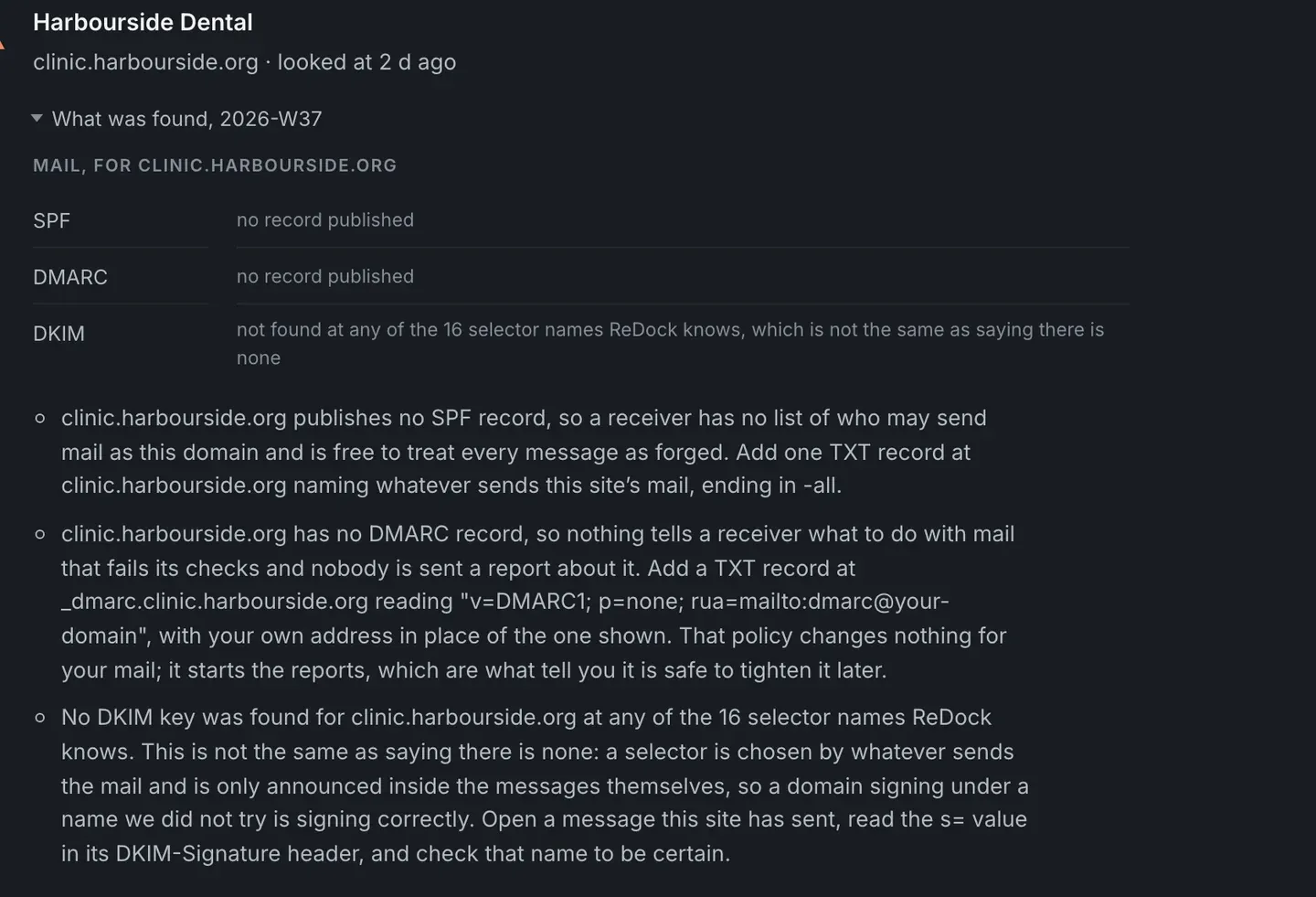
The receiver’s side is read from outside, about once a week, per domain. SPF, the lookup count against the ten a receiver allows, DMARC, and DKIM at the selector names worth trying. A site with nothing published looks like the picture at the top of this post: three rows saying no record, with a paragraph under each naming the record to add and roughly what it should say.
Note the honesty of the DKIM line. It says the key was not found at any of the sixteen selector names it knows, and that this is not the same as saying there is none. A selector is chosen by whatever sends the mail, so the only certain check is to open a message the site sent and read the s= value in its DKIM-Signature header. A tool that reported “no DKIM” flatly would be lying about what it can know.
Here is the same card on a domain where somebody did the work:
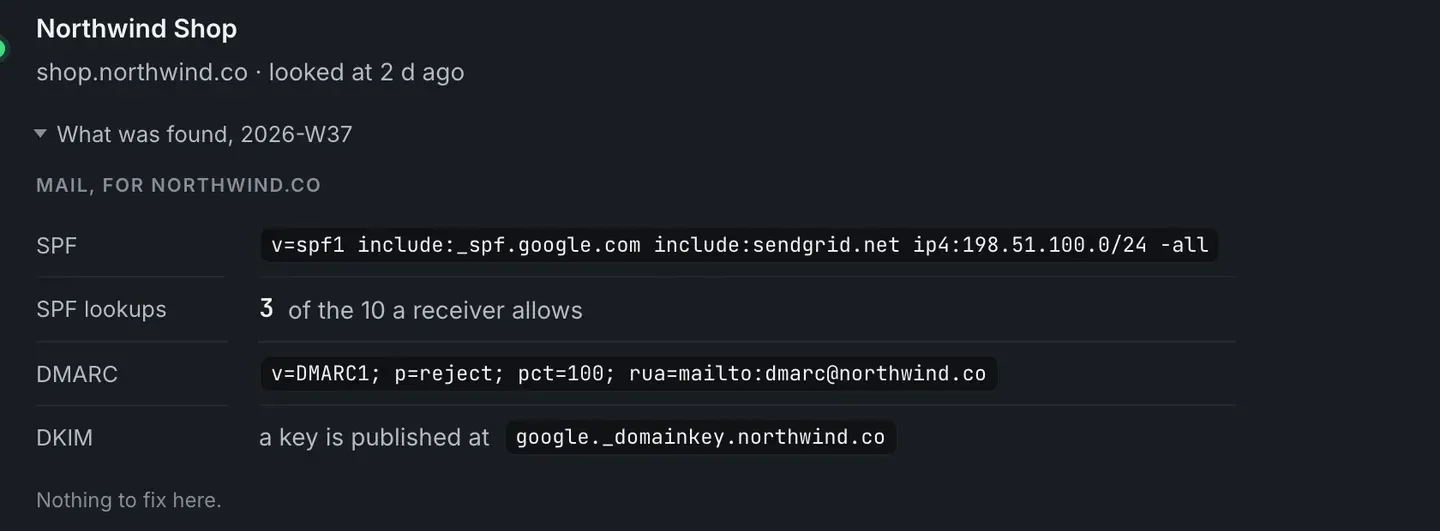
The records are shown as published, not summarised, so you can read them. Three lookups of the ten allowed. DMARC at p=reject, which is where a domain ends up once the reports say it is safe. Then a short line: nothing to fix here.
The health reasons and how each one is worded are on the monitoring page.
The order to work in
- Does the site think it sent? If it logged a failure, that is half one and DNS is irrelevant until you fix it.
- If it sent, where did it go? Send to an address you control, read the
Authentication-Resultsheader. - Fix SPF first, because a missing SPF record is the single most common cause of a message being treated as forged.
- Add DMARC at
p=noneand read the reports for a fortnight before tightening. - Check DKIM from a real message, not from a guess at the selector.
FAQ
Does an SMTP plugin fix deliverability?
It fixes half one. Handing the message to a real mail service reliably is a different thing from that service’s mail being accepted, and if your domain publishes no SPF record you can still land in spam with a perfectly working SMTP plugin.
Why does the check say it might have missed DKIM?
Because a DKIM selector is chosen by the sender and announced inside the message, not in a well-known DNS location. Sixteen common selector names get tried. A domain signing under a name nobody tried is signing correctly, and the card says so rather than claiming there is no key.
How often is the domain side checked?
About once a week, from outside. DNS records do not change hourly, and checking them hourly would be noise.
Does ReDock send mail on behalf of my sites?
No. It reads what the site reports about its own sends and reads what your domain publishes. What sends your mail is your business, and the check works whichever service that is.
Check one domain
A free account connects one live WordPress site, with the mail check and the health reasons on it. Point it at the client whose contact form you have never fully trusted. The domain side comes back within the week and the site’s own failures show up the same day they happen.
Create a free account and check one domain properly.