SSL certificate expiry monitoring for sites you did not set up
SSL certificate expiry monitoring that reads the certificate a site actually serves, counts the days left, and says when the name on it does not cover the address.
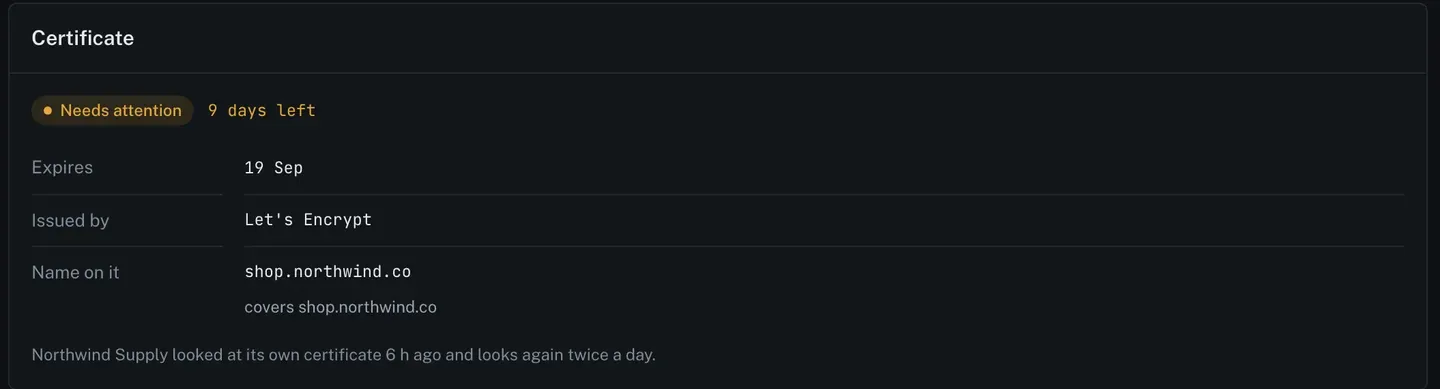
SSL certificate expiry monitoring means reading the certificate a site is actually serving, on a schedule, and warning you while there is still time to do something. It sounds solved. Automatic renewal has been the default for years. It is still one of the most common ways a client site goes dark on a Saturday, because renewal is a process running somewhere, and processes stop. This post covers what to check by hand, then shows the certificate reasons ReDock Web raises across an estate of sites you did not set up.
Why renewal silently stops
Let’s Encrypt issues certificates valid for 90 days by default and recommends renewing every 60. That leaves a month of slack, which is generous and is exactly why nobody notices when it starts being eaten.
The usual causes, in rough order of how often they turn up on inherited sites:
The renewal job stopped. A cron entry, a systemd timer, or a control panel task that was disabled during some unrelated fix and never turned back on. The certificate keeps working for weeks afterwards, so nothing connects the change to the eventual outage.
The HTTP challenge stopped resolving. ACME’s http-01 challenge needs /.well-known/acme-challenge/ to be reachable over plain HTTP. A redirect rule that forces everything to HTTPS with no exception, a WAF, a maintenance-mode plugin, or a new firewall rule will each quietly break renewal while leaving the site perfectly functional.
The domain moved and the certificate did not. A site migrated to a new host, the certificate came with the old one, and DNS now points somewhere with a certificate for a different name. Browsers will not save you here.
A subdomain nobody thought about. The main site is fine. careers. or donate. or shop. has its own certificate, issued once by a person who has since left.
The name on it does not cover the address. A certificate for example.com served on www.example.com, or a wildcard that does not extend to the depth in use. It is valid, it is current, and it is wrong for that hostname.
You can read what a site is serving from any machine:
openssl s_client -connect example.com:443 -servername example.com </dev/null 2>/dev/null | openssl x509 -noout -dates -subjectThat prints the validity window and the name on the certificate. It answers the question for one host, today.
SSL certificate expiry monitoring across thirty sites
The problem is not knowing how to check. It is that the check has to happen on the client’s site, that you did not build, on the Tuesday you were busy.
ReDock Web reads each connected site’s own certificate twice a day and puts what it found on the site page.
The card gives you four facts and nothing else: how many days are left, the expiry date, who issued it, and the name on it with what that name covers. When it is inside the warning window, the card says so and the site’s state changes.
That last field, the name and what it covers, is the one people forget to look at. A certificate can be perfectly current and still be the wrong certificate for the address in the browser. Reading the name every time turns a whole class of migration mistake into a line on a page.
The task: the reason arrives before the outage
Certificate findings do not arrive as their own alert channel. They arrive as one of the reasons on a site’s health, in the same list as PHP and the schedule and the site’s mail.
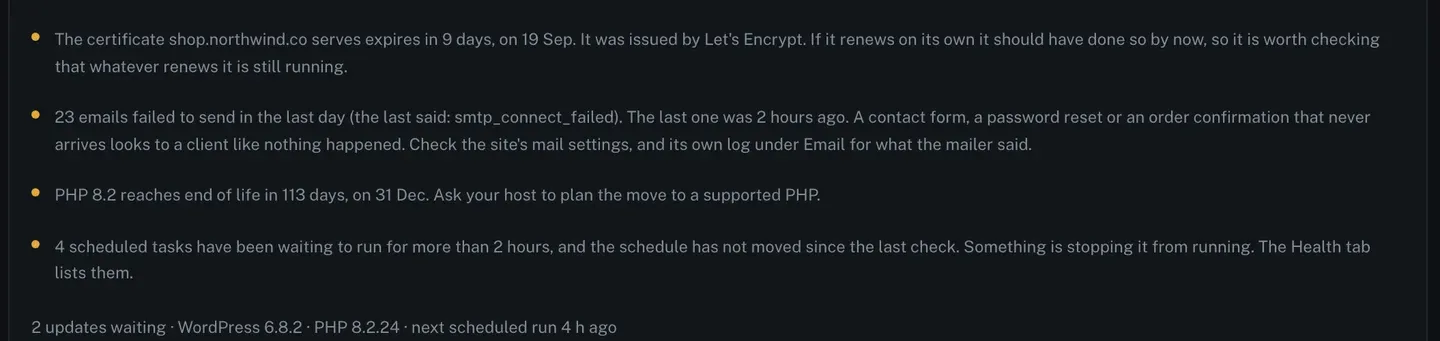
Read the certificate line properly, because the wording is doing real work:
The certificate shop.northwind.co serves expires in 9 days, on 19 Sep. It was issued by Let’s Encrypt. If it renews on its own it should have done so by now, so it is worth checking that whatever renews it is still running.
The fact is the days and the date. The inference is the second half, and it is drawn from the issuer: a Let’s Encrypt certificate with nine days left should already have been replaced, because 60 days is the recommended renewal point on a 90 day certificate. So the reason does not say “renew this”. It says “the thing that renews this has probably stopped”, which is the actual problem and the thing you would otherwise take twenty minutes to work out.
That is what having reasons instead of a score buys you. A score would say 78. This says which process to go and look at.
The steps from there are short.
- Open the site. The reason is on its health card with the certificate card underneath.
- Read the issuer and the name. Automatic issuer plus a short window means a broken renewal. A name that does not cover the address means a migration that half finished.
- Go to where renewal lives. The host’s panel, the ACME client on the server, or the CDN in front of it. Whatever it is, it is not inside WordPress.
- Wait for the next check. ReDock reads the certificate again within twelve hours. When the new one is being served, the reason clears on its own. There is nothing to dismiss, because the reason was never a ticket.
Sites needing attention sort to the top of the list, so a certificate about to lapse is at the top of the page rather than buried at row twenty-nine.
There is more on the reasons, the alerts and the rhythm on the monitoring page.
FAQ
Does ReDock renew certificates?
No. It reads what the site serves and tells you what it found. Renewal belongs to the host, the ACME client on the server, or the CDN in front of it, and putting a second thing in charge of issuing certificates for a site you do not control would cause more outages than it prevented.
How much warning do I get?
The card counts down in days from the moment the window opens, and the site moves to needing attention while there is still time to act. With a 90 day certificate that has already missed its renewal point, that is usually a couple of weeks.
Does it catch a certificate issued for the wrong name?
Yes. The name on the certificate and what it covers are read every time, so a valid certificate served on an address it does not cover shows up as a reason rather than as a green tick.
Do I get an email?
If alerts are on for the workspace, a site changing state emails the owners and admins once, with the same reasons the page shows. It does not email you again the next day about the same standing fact.
Point it at the subdomain you forgot
A free account connects one live WordPress site. If you have a client subdomain that somebody set up once and nobody has looked at since, connect that one. Within half a day you will know what it is serving, who issued it and how long it has.
Create a free account and read one certificate you have never checked.