AI with no API key: a local model that can actually do things
A local model with no key is usually a chat box. Give it real tools and it creates sites and edits WordPress instead, with the tools carrying the correctness.
AI with no API key means running the model on your own machine: no account to create, no key to paste, no per-token bill. The part people miss is that a model like that is usually only a chat box.
The trick is pairing it with real tools. The model decides, the tools act and verify. ReDock ships both halves: a catalogue of local models sized to the memory you have, and the whole app published as MCP tools on 127.0.0.1:47200, so a keyless model on your own hardware can create sites and edit WordPress for real. It is free, on macOS and Windows.
Why no key usually means can only talk
Most keyless AI is a local chat model. It answers questions in a text box, and that is where it ends. Useful and passive. It can tell you how to add a page to WordPress; it cannot add the page.
A raw model has no hands. To act on the world it needs tools: functions it can call to create a site, write a file, install a plugin, sign in. Cloud assistants get those from their platform. A local model in a plain chat app gets none, so it stays a talker.
The missing piece is a tool layer the local model can call. That is what turns keyless AI from a chatbot into an operator.
The catalogue, and what it says about itself
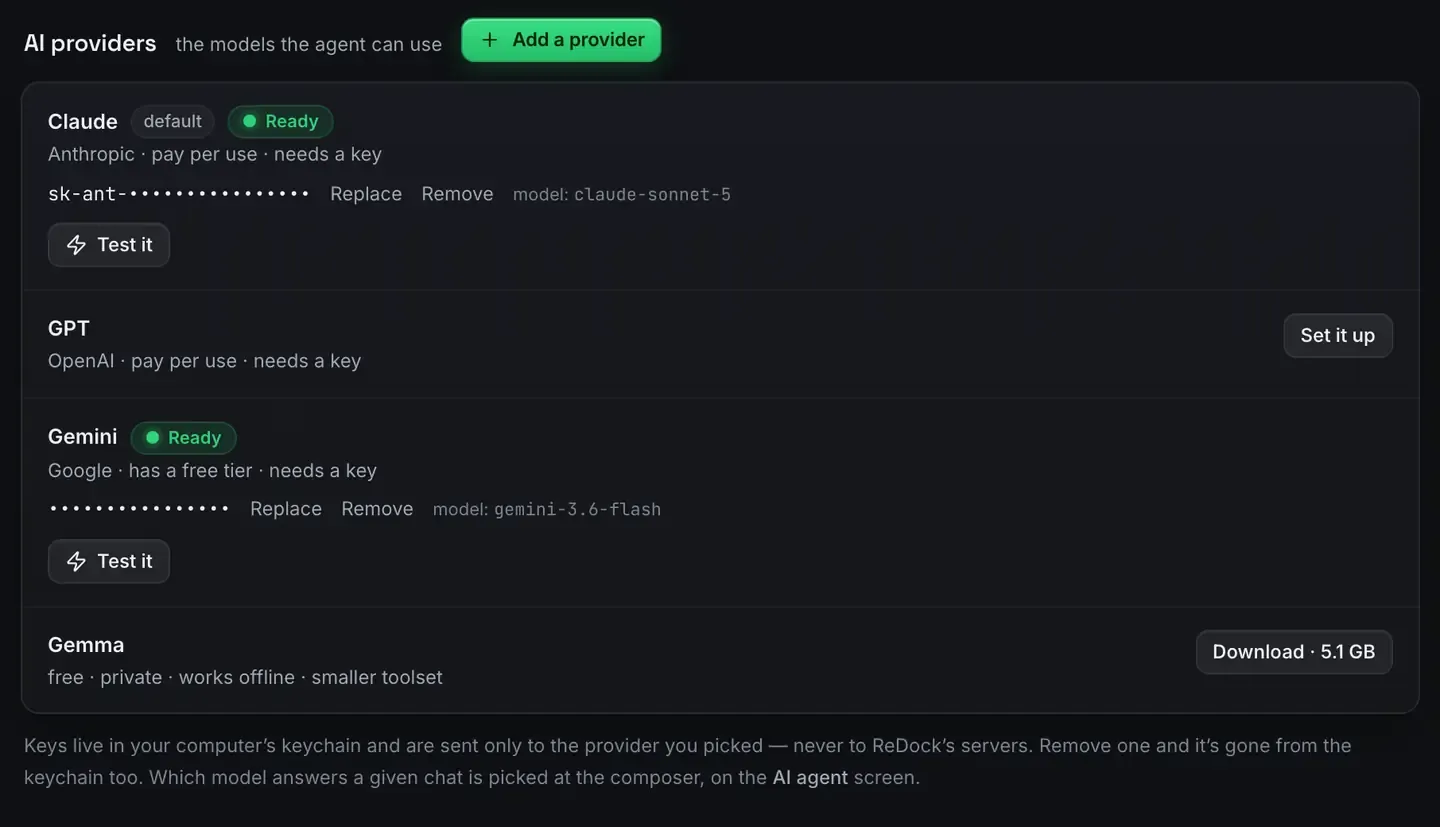
The provider screen at the top of this post puts the choices side by side, honestly. Note its fourth line. The local model is labelled free, private, works offline, smaller toolset. That last word is doing real work: a model that fits on your machine reaches fewer tools than a large cloud one, and the screen says so before you pick it rather than after.

Download once and it runs on your machine. The line underneath applies to the cloud providers: a key you do give goes to that provider and nowhere else, and removing it takes it out of the keychain too.
Tools are what let a small model act
The Model Context Protocol is an open standard for connecting a model to tools. Give a local model an MCP surface and it stops describing actions and starts taking them: picking a tool, calling it with arguments, reading the result back. What is MCP is the primer.
This is also why a modest model is enough. Choosing the right call is a narrower job than open-ended reasoning, and the tools carry the correctness. The model does not have to be brilliant. It has to pick the right call against a well-designed surface, and then the platform executes and checks.
One real task, keyless
Here is what that looks like. Change the hero heading to “Welcome aboard” and make sure it stuck.
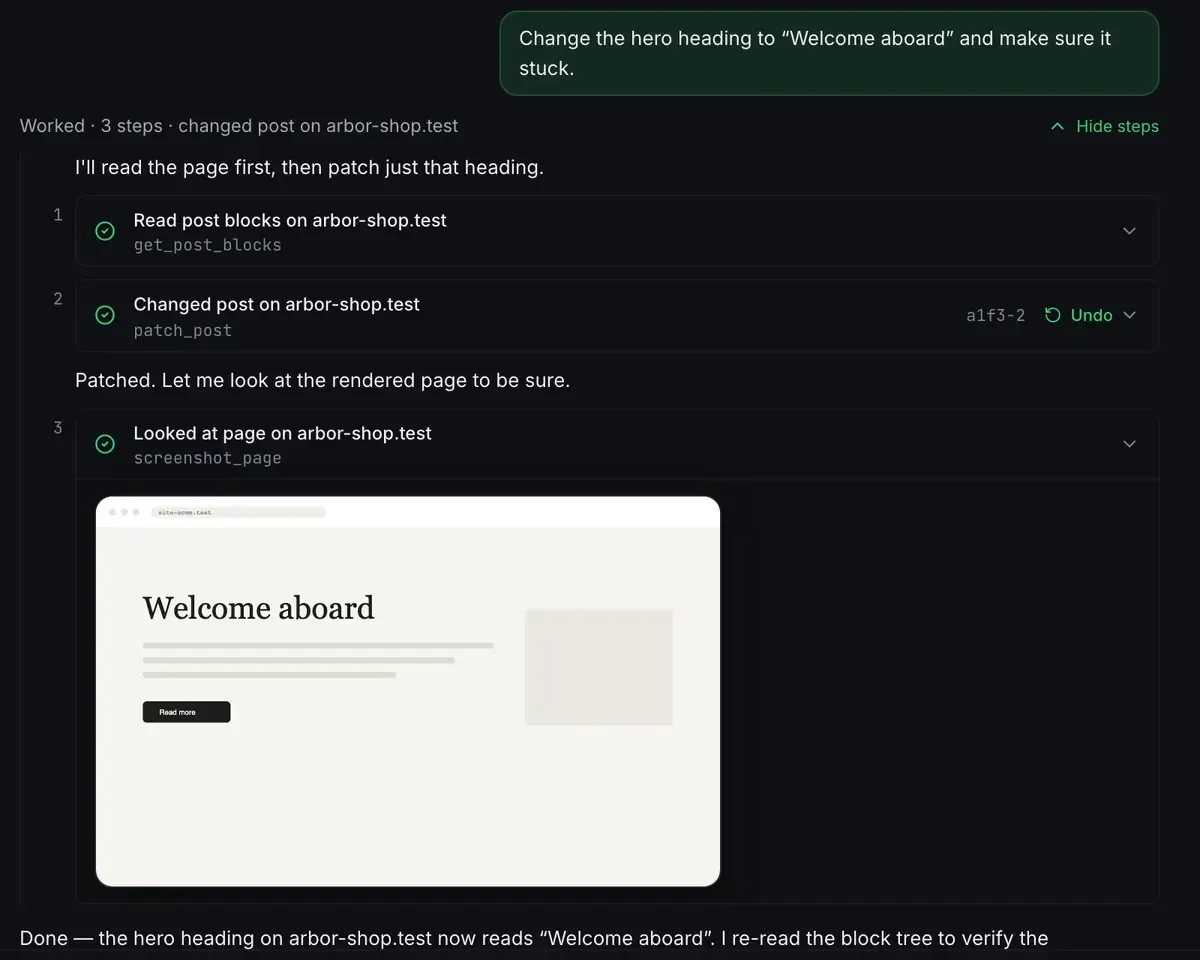
Read, act, verify. The verification step is the one that matters here: the model did not have to be certain, because the tool went and looked. That is why a small model driving a good surface produces work you can trust in a way a small model in a chat box does not.
Beyond that, the same surface creates and starts sites, authors from the theme’s own block patterns, patches an Elementor widget, manages plugins, reads and writes the database with an undo, signs into wp-admin through a single-use link, shares over a tunnel and deploys.
The honest ceiling
A local model will not match a large cloud model on the hardest reasoning. Local models on an 8 GB Mac and Claude versus a local model are candid about where each wins. For tool-driven site work, a keyless model does real work; when you want more reasoning, the same tools accept a cloud model through the same door.
FAQ
How can a model act with no key?
The key is not what gives a model the ability to act. Tools are. ReDock publishes its app as MCP tools that a local, keyless model calls. The model runs on your machine; the tools do the work.
Is a keyless local model good enough to be useful?
For tool-driven tasks, yes. Picking the right call is narrower than deep reasoning, and every change is executed and checked by the platform, so correctness does not rest on the model alone. Harder reasoning is where you would add a cloud model.
What does it cost?
Nothing to run a local model, and the desktop app is free on every plan, on macOS 12 Monterey or later and 64-bit Windows 10 or later.
Where do cloud keys go if I do add one?
Into your computer’s keychain, and to the provider you picked, never to ReDock. Remove it and it is gone from the keychain too.
If you want keyless AI that can actually build and edit sites, download ReDock for macOS or Windows.