WordPress two factor authentication across multiple sites, without a plugin on each
Turn on WordPress two factor authentication across multiple sites from one dashboard, with six hardening protections, and get told when one is switched off elsewhere.
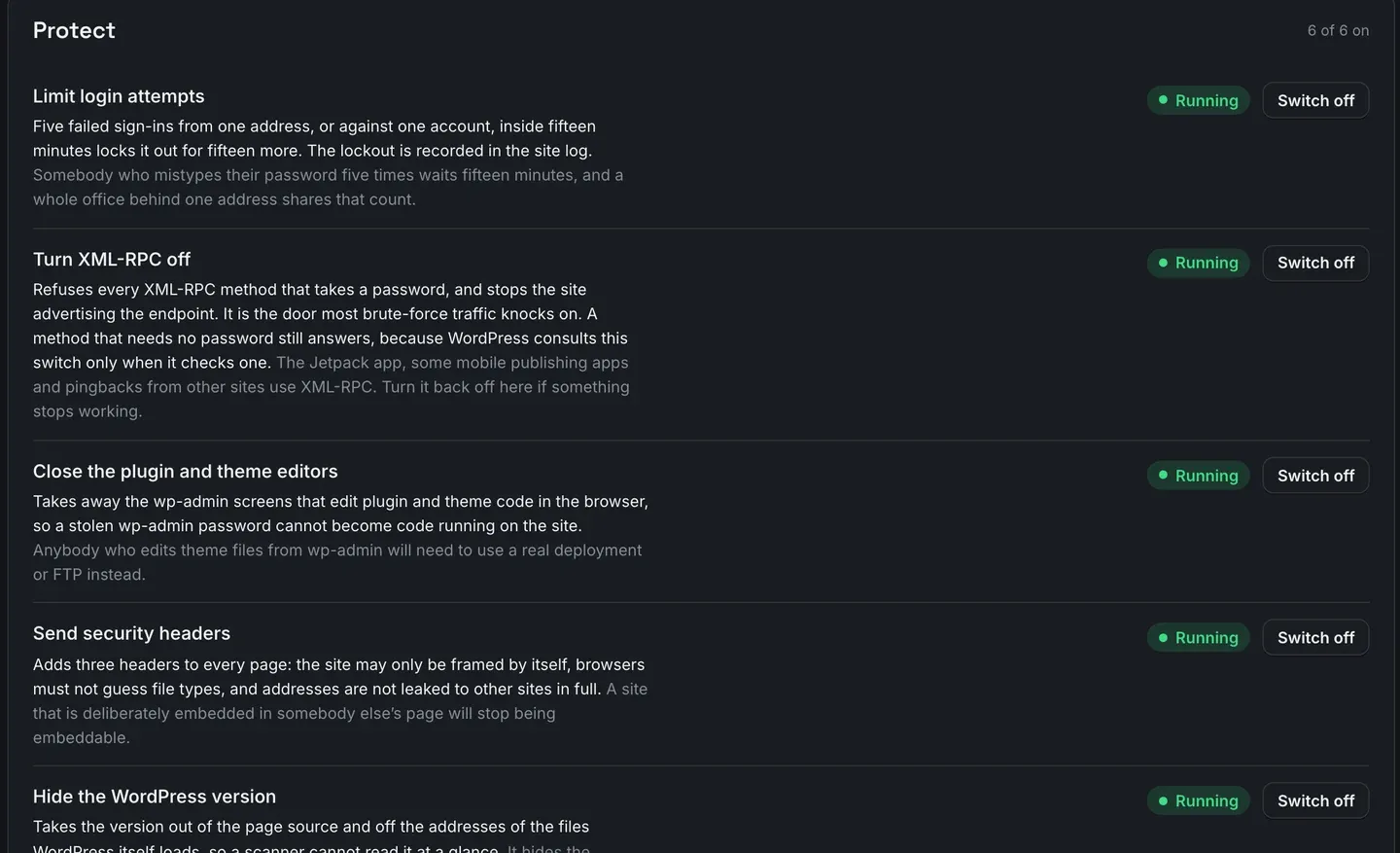
Setting up WordPress two factor authentication on multiple sites is not hard on any one site. It is hard as a policy, because a policy has to be applied thirty times, verified thirty times, and then stay applied while other people work on those sites. In ReDock Web, two-factor and six other protections live on one card per site, you switch them from the dashboard, and if a protection you turned on gets turned off somewhere else the site tells you and names the day it changed. This post switches them on for one site and reads the alert when one drifts.
WordPress two factor authentication on multiple sites is a policy problem
Everyone knows the list. Limit failed sign-ins. Turn off XML-RPC if nothing uses it. Close the file editors in wp-admin. Send the security headers. Stop leaking the WordPress version. Stop user enumeration through ?author=1. Require two-factor for administrators.
None of that is controversial and most agencies have it written down. The problem is drift.
A developer debugs something and turns off the login limiter for an afternoon. A host’s own security plugin re-enables XML-RPC because a mobile app needed it. A migration restores an old wp-config.php and the file editor is back. Six weeks later the site is not in the state your documentation says it is, and nothing anywhere told you.
Drift is not a hardening problem. It is a monitoring problem that people keep trying to solve by hardening harder.
What the card actually does
Each connected site has a Protect card listing seven things: six protections and two-factor sign-in. Each one has what it does in plain words, a state, and one button.
The six protections:
Limit login attempts. Five failed sign-ins from one address, or against one account, inside fifteen minutes locks it out for fifteen more, and the lockout is written to the site’s own log. The note under it is honest about the cost: somebody who mistypes their password five times waits fifteen minutes, and a whole office behind one address shares that count.
Turn XML-RPC off. It refuses every XML-RPC method that takes a password, which stops the brute force traffic that knocks on xmlrpc.php. The note warns that the Jetpack app, some mobile publishing apps and pingbacks from other sites use it, so it is reversible from the same row if something stops working.
Close the plugin and theme editors. Takes away the wp-admin screens that edit plugin and theme code in the browser, so a stolen wp-admin password cannot become code running on the site. Anyone who edits theme files from wp-admin will need a real deployment or FTP instead.
Send security headers. Adds three to every page so the site may only be framed by itself, browsers must not guess file types, and addresses are not leaked to other sites in full.
Hide the WordPress version. Takes the version out of the page source and off the addresses of the files WordPress loads. The note does not oversell it: this hides the number, it does not update anything, and a site behind on updates is still behind.
Block user enumeration. Stops a stranger walking ?author=1, ?author=2 to collect usernames, and closes the REST user list to visitors. Signed-in people and ReDock are unaffected.
Underneath sits a count of locked-out addresses, so the login limiter is not a black box: three addresses locked out today, one still locked.
Two-factor, which is the different one
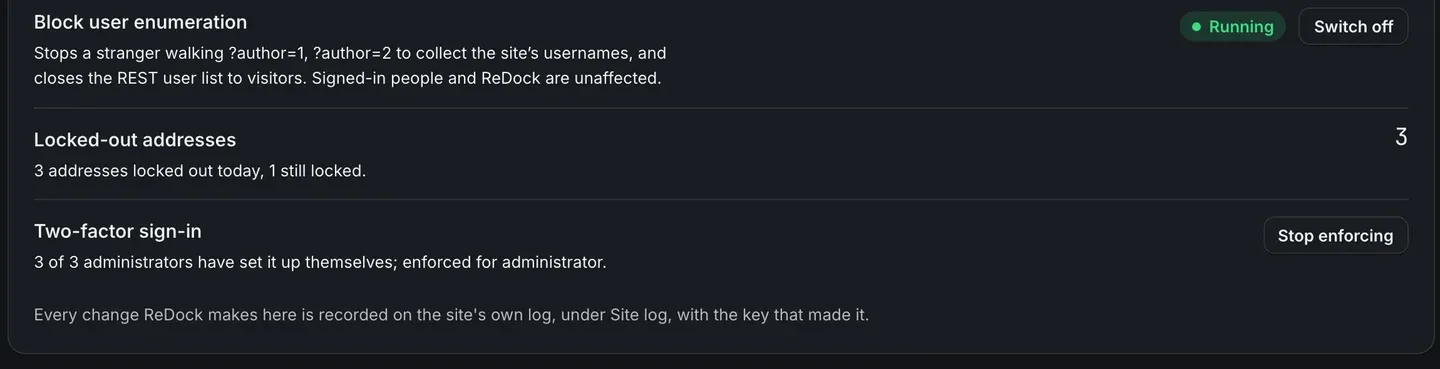
Two-factor sign-in is not a switch you flip on someone else’s behalf, and the card is careful about the distinction. It shows how many administrators have set it up themselves, out of how many there are, and separately whether it is enforced for a role.
That split matters. Enforcing two-factor for administrators on a site where none of them have enrolled is how you lock a client out of their own website on a Friday. The card lets you see the enrolment before you enforce, and Stop enforcing is right there if a client genuinely cannot manage it today.
WordPress has no two-factor in core, so this is real functionality being switched on rather than a setting being surfaced. The two-factor feature plugin is the usual alternative, and installing it on thirty sites and then checking thirty enrolment lists by hand is the work this replaces.
The task: switch it on, then watch it drift
- Open the site, and go to its security tab. The Protect card is there.
- Switch on the six. One press each. Each change is made through the signed channel and written to the site’s own log with the key that made it, so the site’s own records show what ReDock did.
- Look at the enrolment before enforcing. If two of three administrators have set up two-factor, chase the third before you enforce it, not after.
- Enforce for administrator. Now every administrator needs a second factor.
- Leave it.
Step five is where the value is.
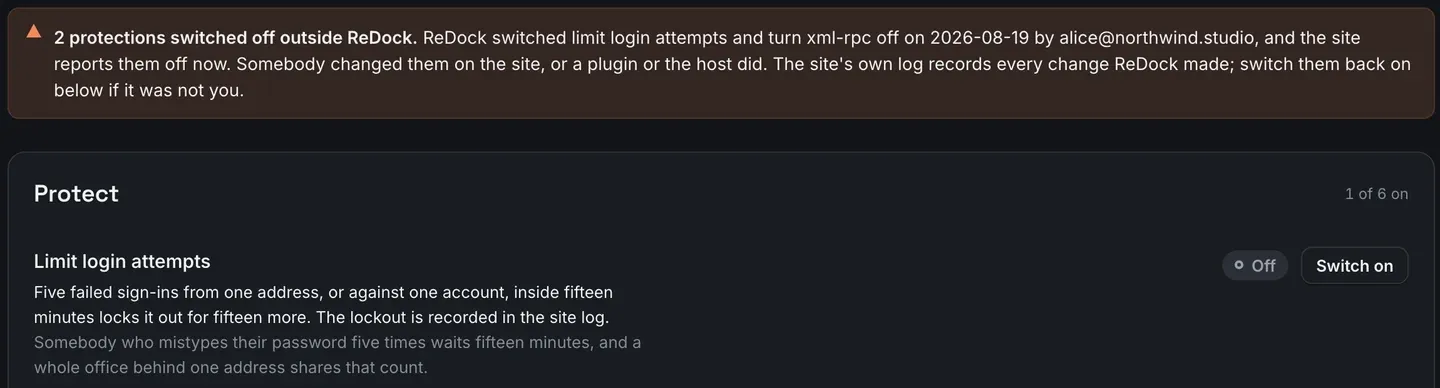
The site is read a few times a day. When what the site reports does not match what ReDock last set, the page says so, and it says it precisely: two protections switched off outside ReDock, the date they were switched on, the person who did it, and the fact that the site reports them off now. Then the honest hedge, because we cannot know which: somebody changed them on the site, or a plugin or the host did.
The card header drops to “1 of 6 on”, so the state is visible on the page as well as in the banner, and switching them back on is one press per row.
This is the thing a checklist cannot do. A checklist tells you what should be true. This tells you what is true, this morning, on every site.
More on what the site page reads and how often is on the connected sites page.
FAQ
Does this install a security plugin on each site?
No. The protections are applied by ReDock Connect, the plugin that connects the site in the first place. There is no second plugin, and switching a protection off from the card removes the behaviour rather than leaving it dormant.
Can I turn these on for a whole client at once?
The protections are set per site from the site’s own card. Jobs are what run across many sites, and hardening is not a job kind today, so the honest answer is that thirty sites means thirty visits to a card. The drift alert is what stops it needing doing twice.
Will turning off XML-RPC break anything?
It can. The Jetpack app, some mobile publishing apps and pingbacks from other sites use XML-RPC. The card says so on the row rather than after you have pressed it, and turning it back on is one press.
What if a client cannot manage two-factor?
Stop enforcing is on the same row. Enrolment and enforcement are separate for exactly this reason, so you can see who has actually set it up before you make it compulsory.
Harden one site and forget about it
A free account connects one live WordPress site with the Protect card, the two-factor enforcement and the drift check on it. Switch the six on, enforce two-factor, and see what the site tells you in a month.
Create a free account and harden one site properly.