WordPress cron not running: the real causes, and how to see it from outside
WordPress cron not running is rarely a broken daemon. The four causes worth checking first, and how to spot a stalled schedule across a whole estate.
WordPress cron not running is almost never a broken cron daemon, because WP-Cron is not a daemon. It is a list of due jobs that WordPress checks on page loads, firing a loopback request to wp-cron.php when something is overdue. So when scheduled posts stop publishing and update checks go quiet, the cause is usually one of four things: nobody is visiting, a cache is answering visits without waking PHP, the loopback request cannot reach the site, or the constant that disables it was set and never replaced. Here is how to tell which, and how to see a stalled schedule across a whole estate.
Why WordPress cron is not running: four causes
WordPress keeps a schedule of due events in the options table. On a page load, it checks whether anything is overdue, and if so it fires a non-blocking HTTP request back to its own wp-cron.php, which runs the due jobs. The plugin handbook is explicit about the consequence: WP-Cron only runs when the page is loaded.
Everything that goes wrong follows from that one sentence.
Cause one: nobody is visiting
A brochure site for a local dentist might get forty visits a day, clustered in office hours. Overnight, nothing is due-checked because nothing loads. The 3 a.m. backup never runs, and the 6 a.m. scheduled post appears whenever the first visitor of the morning arrives.
The fix is to stop relying on visitors. Set DISABLE_WP_CRON to true in wp-config.php and add a real system cron that requests wp-cron.php on a schedule. The handbook has the exact recipe, and most decent hosts have a cron entry field in their panel that does the same thing.
Cause two: a cache is answering instead of PHP
This one catches people who did everything else right. Full-page caching, whether it is a plugin writing static HTML or a CDN in front of the site, means most visits never reach PHP. No PHP, no schedule check. The site is busy and the cron is starving.
The symptom is a schedule that moves in fits: it catches up whenever an admin signs in, because wp-admin is not cached, and then goes quiet again.
Same fix. A real cron entry does not care what the cache is doing.
Cause three: the loopback request cannot get through
WP-Cron calls its own site over HTTP. If that request is blocked, nothing runs even though visits are plentiful. The usual culprits are HTTP authentication on a staging site, a firewall rule that blocks requests from the server to itself, a host that does not resolve its own domain internally, or a hosts entry left over from a migration.
You can test it from the site itself with WP-CLI:
wp cron event list
wp cron event run --due-now
If the list shows overdue events and --due-now runs them fine by hand, the schedule is not broken. The trigger is.
Cause four: one job is fatally erroring
A single scheduled task that hits a fatal error can take the run down with it, and everything queued behind it stays queued. wp cron event list will show a growing pile of overdue events with the same first entry stuck at the front. Running that one event on its own usually produces the error in plain sight.
ALTERNATE_WP_CRON exists for hosts where the loopback is genuinely impossible, and it works by redirecting the visitor, which is why it is a last resort rather than a default.
Seeing it across forty sites
All of that is fine when you know which site to look at. The problem for anyone running an estate is that a stalled schedule is silent. Nothing errors. The client notices in three weeks when they ask why the newsletter did not go out.
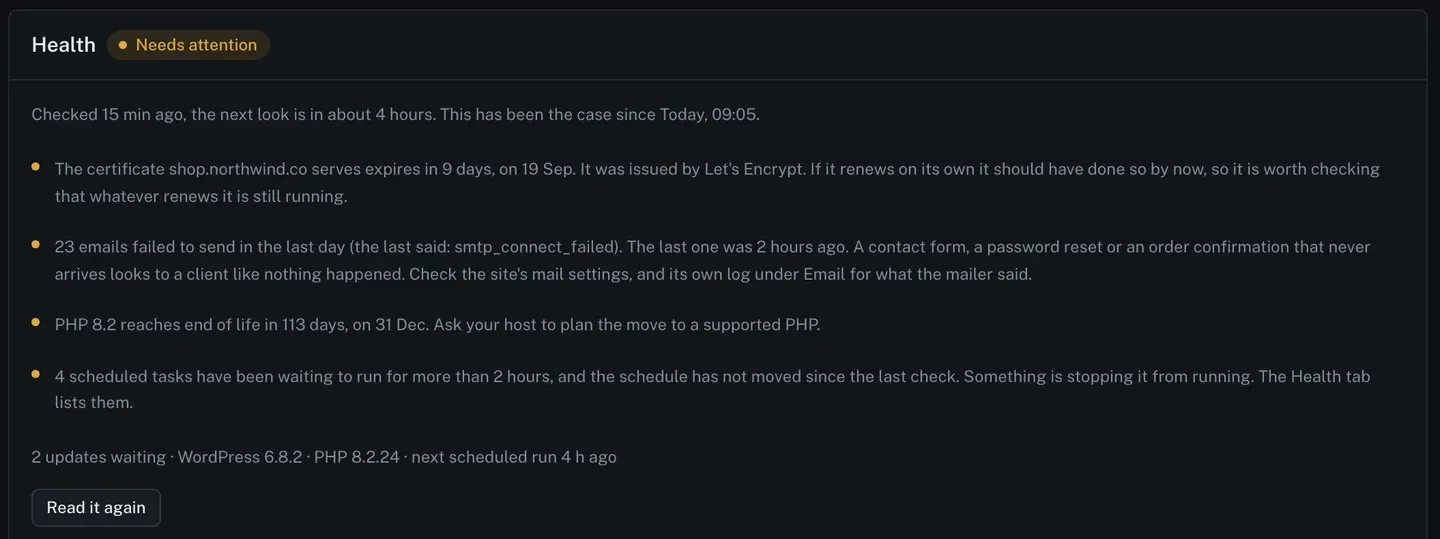
ReDock Web checks every connected site a few times a day and turns what it finds into a list of reasons rather than a score. One of those reasons is the schedule.
The wording is specific because the detection is: tasks have been waiting to run for more than two hours, and the schedule has not moved since the last check. Both halves are needed. A busy site always has something a few minutes overdue, and treating that as a fault would mean crying wolf on every site you own. It is the not-moving part that means something is actually stuck.
The task: find the stalled site and unstick it
1. Read the reason on the site list
The site list sorts by what needs attention. A site whose schedule has stopped shows as needing attention with the reason on its row, and opening the site puts all its reasons in one card.
2. Look at the overdue tasks
The health tab lists them by name, with how late each one is and what interval it repeats on.
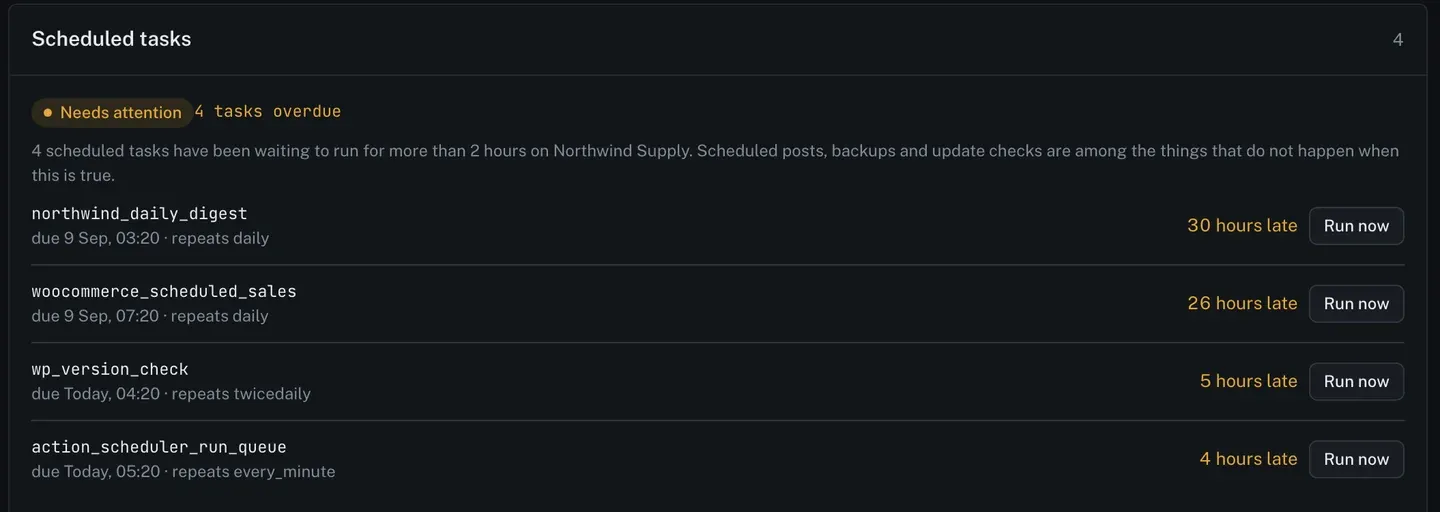
This is the diagnostic bit. The hook names tell you whose schedule it is. wp_version_check five hours late means WordPress itself is not checking for updates, which is why the plugin count on that site looked suspiciously stable. woocommerce_scheduled_sales a day late means a sale price did not switch over. action_scheduler_run_queue repeating every minute and four hours late means a plugin’s own queue has stopped, which usually takes orders or emails with it.
That list is the difference between “cron is broken” and “this specific thing did not happen to this client, on this day”.
3. Press Run now
Each row has one. It runs that event on the site, through the signed channel, recorded under your name like anything else. If it runs cleanly, the trigger is the problem and you go and set a real cron entry. If it errors, you have found cause four and you know which task.
4. Fix the trigger, then check back
Add the system cron, or get the host to. The next health check will see the schedule moving and the reason will clear on its own. Nothing needs dismissing, because the reason was never a ticket; it was a reading.
There is more on what the health check looks at and how each reason is worded on the monitoring page.
FAQ
Is a few overdue tasks always a problem?
No, and that is why the check needs both conditions. A busy site normally has something a minute or two late. What matters is whether the schedule is advancing at all between two checks a few hours apart.
Does pressing Run now break anything?
It runs one scheduled event the way WordPress would have run it. If the event is idempotent, which most are, nothing surprising happens. If you are unsure what a hook does, look at what registered it before you press.
Should I disable WP-Cron on every client site?
On any site where something time-sensitive is scheduled, yes: set the constant and add a real cron entry. On a small brochure site with nothing scheduled but update checks, the default is usually fine.
Will this tell me a task errored?
The health reason tells you the schedule has stopped moving, which is what a fatal error in a task looks like from outside. Pressing Run now on the stuck task is what surfaces the error itself.
Watch one site’s schedule
A free account connects one live WordPress site, with the health checks and the overdue task list on it. If you have a site where you are not sure the schedule is running, that is the one to connect first. The answer arrives within a few hours without you having to go and look.
Create a free account and find out whether your schedule is moving.