WordPress core file integrity check: what it proves, and what it misses
A WordPress core file integrity check compares every core file with the checksum WordPress.org published for that exact version, and names anything changed or never shipped.
A WordPress core file integrity check compares every file WordPress ships with the checksum WordPress.org published for that exact version and language, and reports three things: files that no longer match, files that are missing, and files sitting in wp-admin or wp-includes that WordPress never shipped at all. That third category is the one that matters, because a PHP file with an innocent name in a core directory is what a backdoor looks like. Here is how the check works, how to run it by hand, and how to have it run daily across an estate.
The WordPress core file integrity check you can run yourself
WP-CLI has this built in. On any site you can reach over SSH:
wp core verify-checksumsIt fetches the checksums for the site’s own version from the WordPress.org API and compares every core file. The command’s documentation is short and worth reading, because the output has a shape people misread.
Two kinds of line come back. File doesn't verify against checksum means the file exists but its contents differ from what was published. File should not exist means there is a file in a core directory that is not part of that release.
There is a plugin equivalent too:
wp plugin verify-checksums --allThat one only covers plugins from the WordPress.org directory, because those are the only ones with published checksums. A premium plugin bought from a vendor’s own site has nothing to compare against, and no tool can invent one.
What a hit actually means
Do not panic at the first line of output. In order of likelihood:
A modified core file is usually a person. Somebody edited wp-config-sample.php, or a host dropped its own wp-content/advanced-cache.php shim, or a developer patched a core file in 2019 and forgot. Ugly, but not malicious.
A missing core file is usually a security plugin or a host. Plenty of hardening tools delete readme.html, license.txt or xmlrpc.php. That is a deliberate removal, not damage.
A file that was never part of WordPress is the one to look at. Core directories are not somewhere anything else has business writing. A .php file with a plausible name and a recent modification time inside wp-includes is the classic shape of a backdoor: named to blend in, placed somewhere nobody browses, and reachable directly by URL.
If you find one, the file itself is not the end of it. Whoever wrote a file could write another one, and could have taken your keys and passwords on the way. Restoring the files from a clean copy of the same WordPress version is step one. Rotating every password, every application password and the salts in wp-config.php is step two, and skipping it is how the same site gets reinfected a week later.
The problem with doing it by hand
wp core verify-checksums is excellent and it has one flaw as a routine: somebody has to run it. Across thirty client sites, on the sort of Tuesday where two of them have other problems, nobody does.
ReDock Web runs the same comparison daily, on each connected site, and keeps the result on the site’s Security tab.
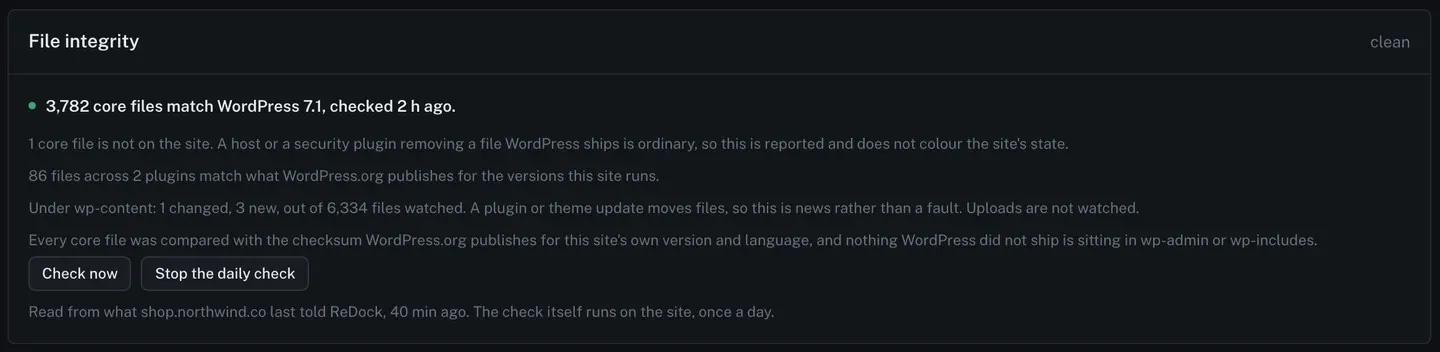
Read the clean card at the top of this post carefully, because it is unusually specific about scope. Every core file was compared with the checksum WordPress.org publishes for this site’s own version and language. Plugin files from the directory were compared with what WordPress.org publishes for the versions this site runs. Under wp-content, changes are counted against a watched set. And uploads are not watched at all, said plainly, because a media library is where people add files on purpose and watching it would produce noise forever.
Saying what is not watched is the part most tools leave out.
The task: read a site that has been got at
Here is the same card on a site with findings.
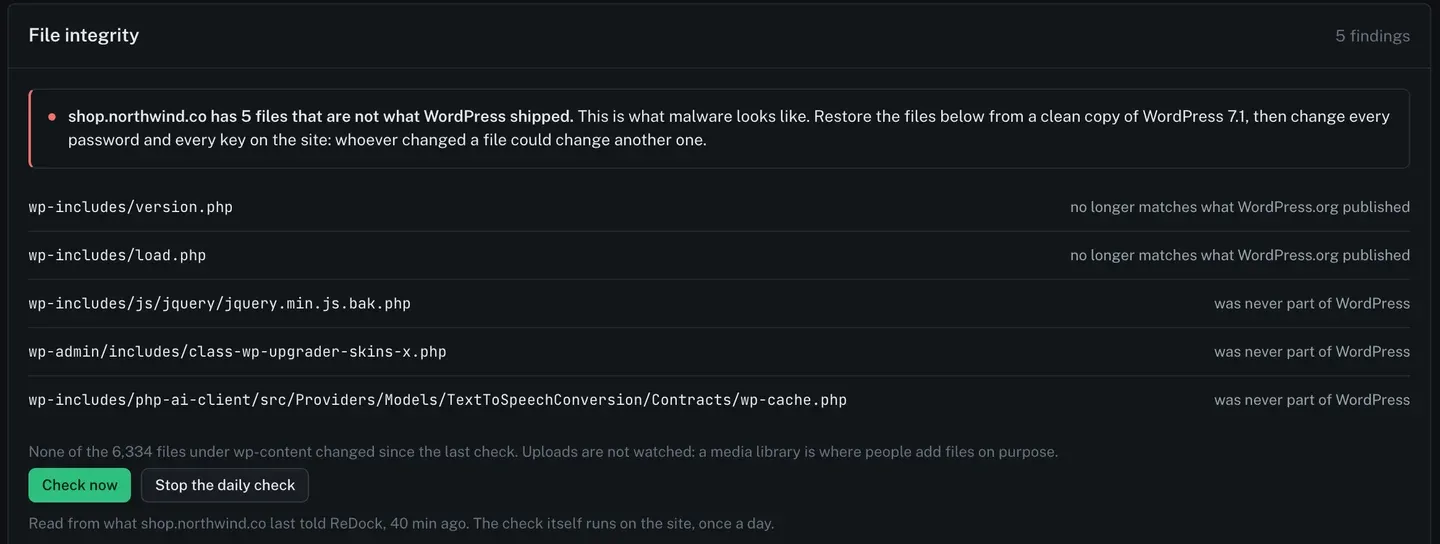
Five findings, each named by path, each with what is wrong with it in the same row.
Two are core files that no longer match what WordPress.org published. Three were never part of WordPress, and their names are the giveaway: a .bak.php sitting in the jQuery directory, an extra class-wp-upgrader-skins-x.php in wp-admin/includes, and a wp-cache.php buried several directories deep under a plausible-looking vendor path. Each of those is a normal-looking name in a directory where nothing new belongs.
The line at the top says what to do, in one sentence: restore the files below from a clean copy of that WordPress version, then change every password and every key on the site, because whoever changed a file could change another one.
Underneath, the count that keeps it in proportion. None of the 6,334 watched files under wp-content changed since the last check. That tells you the intrusion is in core rather than spread through the plugins, which is a different afternoon.
Two buttons: Check now, which runs it immediately rather than waiting for the daily pass, and Stop the daily check if a site genuinely needs to be left alone. The footnote says when the last result was read and reminds you the check itself runs on the site, once a day.
The security tab sits alongside the rest of what a site page reads, described on the connected sites page, and every change made through ReDock lands in the activity record.
What this is not
It is a comparison against published checksums. It is not a malware scanner, it does not read the contents of your files looking for patterns, and it will not find anything living in your database, in a theme you paid for, or in a plugin that has no published checksums to compare against.
Every hour, every plugin and theme on every connected site is also compared with the published vulnerability records, and an affected plugin is marked on the site with the version that fixes it (the records are sourced from Wordfence Intelligence and MITRE). The file comparison is the other half: daily, on every connected site, with the findings named.
FAQ
How is this different from running WP-CLI myself?
It is the same comparison, against the same published checksums. The difference is that it runs every day on every connected site without anybody remembering, and the result is on a page you already look at.
Does it check plugins and themes?
Plugin files from the WordPress.org directory are compared with what WordPress.org publishes for the versions the site runs. Premium plugins and custom themes have no published checksums, so nothing can be compared for them, and the card does not pretend otherwise.
Why are uploads not watched?
Because the media library is where people are supposed to add files. Watching it would produce a change every time somebody posted a photograph, which trains everyone to ignore the report. Core and the watched part of wp-content are where an unexpected file is actually news.
A file was flagged and I know it was my host. What now?
Nothing breaks. The finding is a statement about what the file is, not an accusation. Hosts and security plugins do remove and add files legitimately, and the card separates “no longer matches” from “was never part of WordPress” precisely so you can tell the two apart at a glance.
Check one site tonight
A free account connects one live WordPress site and runs the daily file check on it. If you have inherited a site with an unclear history, that is the one to point it at. The first result arrives within a day, and Check now does not even make you wait that long.
Create a free account and run the check on a site you inherited.